

How to Use ETo (FAO Penman-Monteith) in Real-Life Irrigation Decisions
Understanding ETo: What It Is and Why It Matters
Evapotranspiration (ET) describes the combined processes of water loss from soil (evaporation) and vegetation (transpiration) into the atmosphere. Reference evapotranspiration (ETo) refers specifically to ET from a standardized well-watered grass surface, used as a baseline to determine actual crop water needs.
The FAO Penman-Monteith method (FAO‑56) is the global standard for calculating ETo, integrating weather data like solar radiation, temperature, wind speed, and humidity. This accuracy makes it indispensable for effective irrigation planning.
Why ETo Helps You Irrigate Smarter
Using ETo in irrigation lets you:
Avoid guesswork: Schedule watering based on scientific data.
Adapt irrigation to changing daily weather and crop needs.
Ensure consistent performance across fields, unlike soil readings which vary locally.
Pair with soil sensors or visual checks for even better planning.
Step 1: How to Get ETo Data for Your Field
You can obtain ETo in two main ways:
a) From Local Weather Stations or Ag Extensions
Many agricultural services publish daily ETo data, often free. For instance, local extension services may offer averages or forecasts for your region.
b) Calculating ETo Yourself
The FAO‑56 method requires:
Temperature (min/max)
Solar radiation
Wind speed
Humidity
This can be complex, but the Irrigation Calculator Pro app simplifies it, more on that in Step 3.
Step 2: Translate ETo into Actionable Water Needs
Once you have ETo, apply it using crop-specific factors:
ETc = ETo × Kc
Where ETc is your crop’s actual water need, and Kc is the crop coefficient. A high Kc (e.g., 1.2) means higher demand; low Kc (e.g., 0.7) means lower demand during early growth.
Subtract recent rainfall and factor in soil’s available water (AWC) to determine when and how much to irrigate.
Step 3: Use Irrigation Calculator Pro to Do It Instantly
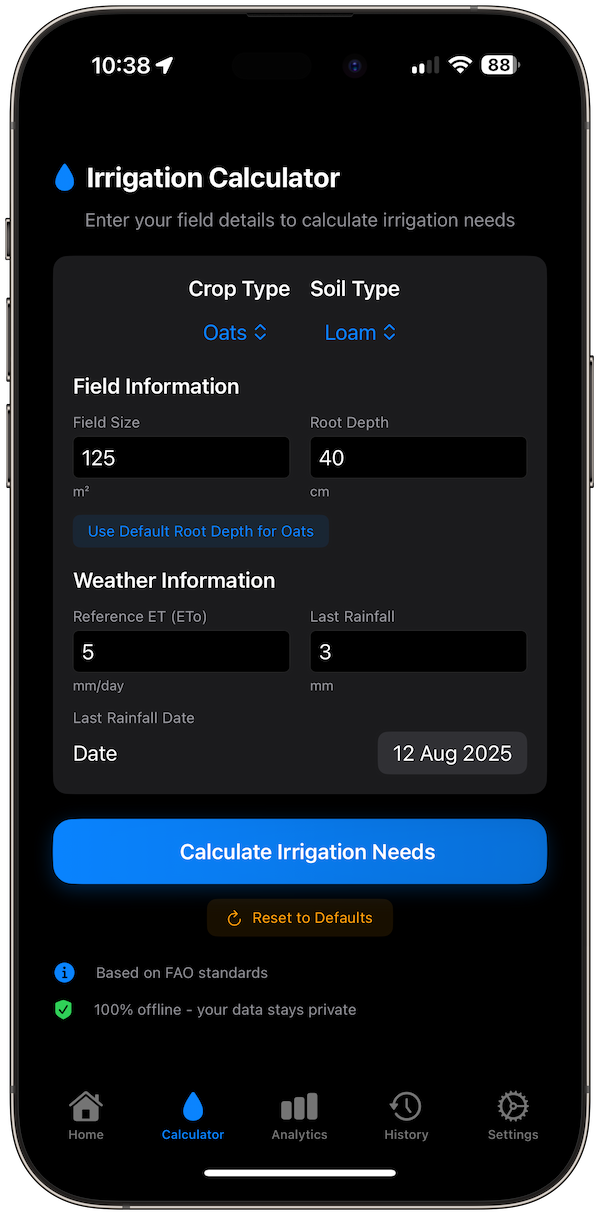
Here’s how Irrigation Calculator Pro streamlines the process:
Enter ETo: paste your daily ETo value.
Select Crop: this sets Kc automatically.
Choose Soil Type: defines AWC and depletion thresholds.
Input Recent Rainfall: accounts for natural precipitation.
Tap Calculate Irrigation Needs: and the app instantly gives you:
How much water to apply (liters or gallons)
When to irrigate next (based on soil depletion)
Visual schedule + history
No math, no complex formulas, just plug in your data and get a plan.
Example in Practice
Imagine you’re growing corn (Kc ≈ 0.9) with ETo at 6 mm/day, and you’ve received 5 mm rain recently.
Enter 6 mm/day ETo
Select corn crop
Select loamy soil
Recent rainfall: 5 mm
Tap Calculate Irrigation Needs
Result: the app calculates ETc (5.4 mm/day), adjusts for rain, and provides irrigation volume and timing, straightforward and reliable.
Why the FAO-56 + App Combo Works
Accurate: FAO‑56 is the benchmark for ETo calculation.
Fast: Your phone does the heavy lifting.
Private: Fully offline, no data collection.
Clear: Visual schedule and analytics make it easy to follow.
Final Thoughts
Using ETo from the FAO Penman-Monteith method gives precision. Pairing that with Irrigation Calculator Pro turns complex irrigation math into a few taps. It’s the dependable, science-based approach gardeners and farmers can trust.
References
Number Analytics: Mastering Reference Evapotranspiration in IrrigationUC IPM: Irrigation scheduling using evapotranspiration (ET)Agriculture Victoria: What is evapotranspiration and how do I use it to schedule irrigations?UC Landscape Plant Irrigation Trials: ETo IrrigationFAO Home: Chapter 4 - Determination of EToIrrigation Calculator Pro Application