
Windows 11 · Windows
Fix the Wi-Fi option missing in Windows 11
Source-checked About 10 minutes
Answer
Run Windows network diagnostics, enable the Wi-Fi adapter, and install the PC maker's matching driver when Windows cannot detect it.
Distinguish a missing adapter from one missing network
Check whether Windows lacks the entire Wi-Fi control, Device Manager lacks the adapter, or only one network name is absent. Record the PC and adapter model before changing drivers.
Start with hardware and diagnostics
Turn off Airplane mode, enable any physical wireless control, and run Get Help before reinstalling the exact PC-maker driver. Do not use generic driver sites.
Check hardware controls
Turn off Airplane mode and confirm any physical wireless switch is enabled.
Run the troubleshooter
Open Get Help and run the Network and Internet troubleshooter.
Enable the adapter
Open Device Manager > Network adapters and enable the wireless adapter if it is disabled.
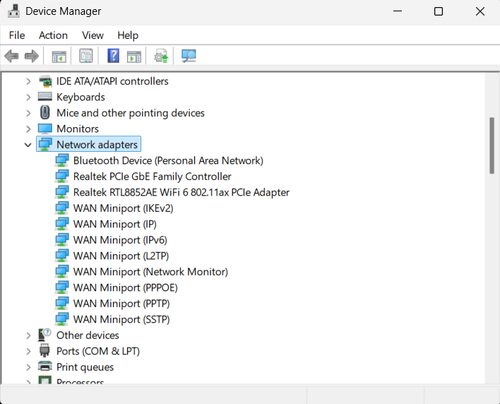
Restore the driver
Download the current Wi-Fi driver from the PC manufacturer, uninstall the adapter, restart, and install that driver if Windows does not restore it.
Verify the result for the missing Wi-Fi adapter
The adapter appears, discovers the intended network, reconnects after restart, and retains the expected driver. Repeat the original task once after reopening the relevant app or settings page, so a temporary screen refresh is not mistaken for a completed result.
Narrow down problems with the missing Wi-Fi adapter
If Device Manager shows no adapter, an error code remains, only one SSID is absent, or the manufacturer package does not match the hardware, stop broad resets and return to the last known state. Capture the exact error, versions, hardware or account scope, and failed step before using the linked official support channel.
Video walkthrough
If it does not work
- If the missing Wi-Fi adapter is unchanged after the documented check, return to the first observed condition and identify whether it affects one app, account, device, or every task before repeating steps.
- If the labels differ after an update or the device is managed, retain the exact condition and use the linked owner source before removing data, resetting Windows, or installing an unrelated tool.
Sources and verification
Checked against official documentation on . Scope: Windows.
Follow the linked first-party guidance if labels differ after a platform or app update.