
Windows 11 · Windows 11
Fix a VPN Not Working in Windows 11
Source-checked About 15 minutes
Answer
First disconnect the VPN and confirm normal websites work. Then check the VPN server, account, and error message, reconnect the profile, and update the VPN app. Recreate the Windows VPN profile only if its saved settings are wrong. A VPN will not repair a broken internet connection.
- Test without VPNThis separates internet trouble from VPN trouble.
- Record the errorAuthentication, server, and network errors need different fixes.
- Use provider settingsDo not guess the protocol or server address.
Record the failure
Note the complete error, VPN provider, server, and whether it fails before or after asking for credentials.
Test the internet without the VPN
Disconnect the VPN and open two ordinary HTTPS websites. If neither loads, fix the Wi-Fi or Ethernet connection first.
Check the provider
Open the VPN provider's status or account page. Confirm the subscription, correct server, username, and any current outage.
Reconnect cleanly
Restart Windows, open only the VPN app, choose a nearby supported server, and connect once. Avoid switching servers repeatedly during the same test.
Update the VPN app and Windows
Install the VPN app's official update and pending Windows network updates, then restart if required.
Recreate a Windows profile only when needed
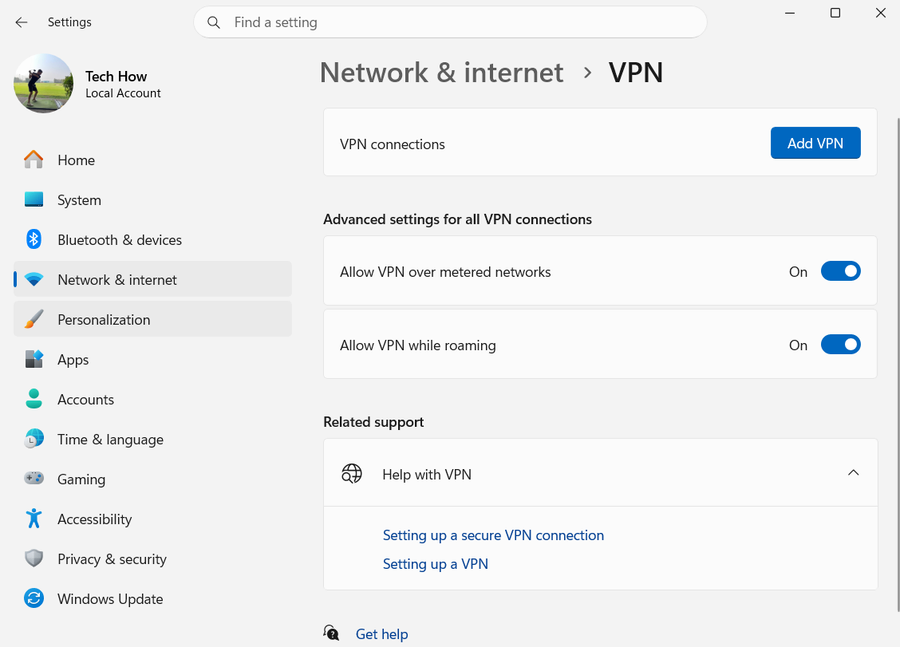
For a manually configured profile, open Settings > Network & internet > VPN, remove only the broken profile, and recreate it using the provider's exact server and protocol.
Compare one other network
If allowed, test a trusted phone hotspot. A result that changes by network may point to the router, workplace, hotel, or ISP blocking the connection.
Optional sponsored resource
This link is optional and is not required to complete the tutorial. Tech How may earn a commission if you use it. It does not change the recommended steps above, and you should read the provider's current price, requirements, and privacy terms before installing or paying.
If it does not work
- If sign-in fails, reset the VPN password through the provider rather than changing Windows credentials.
- After Windows Network reset, VPN software and virtual adapters may need reinstalling, so use it only as a last resort.
- Do not disable the Windows firewall globally. Follow the VPN provider's exact app rule only if the firewall log shows a block.
Sources and verification
Checked against official documentation on . Scope: Windows 11.
The written instructions were checked against the current official pages linked below. The older video is kept for reference and may show different menus.