
Gaming · Platform not recorded
Best V Rising Settings | Boost FPS & Fix Lag Guide
Original source date
Answer
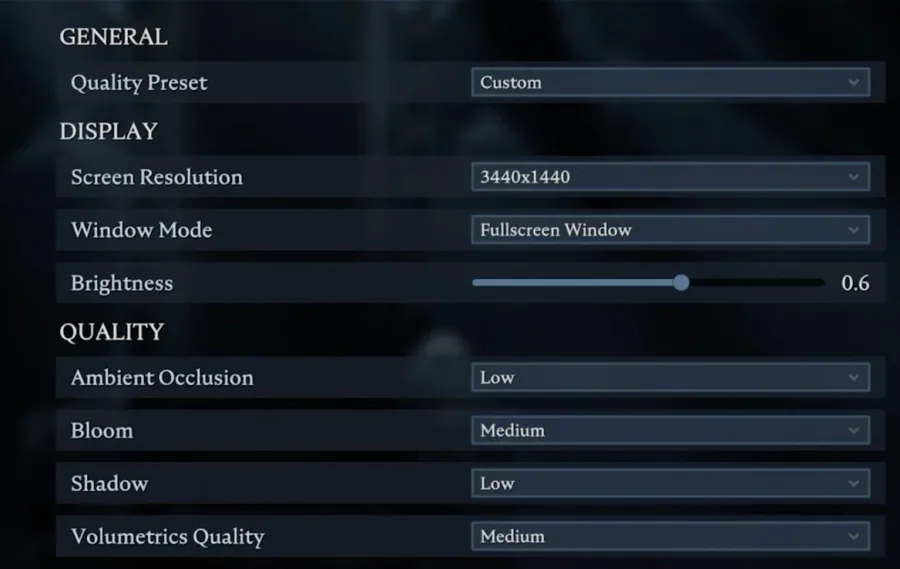
Open up V Rising and navigate to your Graphics Options. You can choose a Quality Preset. When using a low to mid-end PC, then make sure to set it to Medium for now. All of the next settings will be set for a mid-end PC that doesn't have a lot of resources to spare. If you’re using a higher-end CPU and GPU, then feel free to increase some of the following settings suggestions. Set the Screen Resolution to your native monitor resolution. To get the best performance, make sure to play in Fullscreen Mode. The Brightness option below will not affect your performance, so set this to your personal preference. Set the Ambient Occlusion option in your Quality settings to Low, Bloom to Medium, Shadow to Low, and Volumetric Quality to Medium. I prefer to set the shadows to a minimum, but you might want to increase the setting to Medium.
V Rising Graphics Settings
Open up V Rising and navigate to your Graphics Options. You can choose a Quality Preset. When using a low to mid-end PC, then make sure to set it to Medium for now. All of the next settings will be set for a mid-end PC that doesn't have a lot of resources to spare. If you’re using a higher-end CPU and GPU, then feel free to increase some of the following settings suggestions. Set the Screen Resolution to your native monitor resolution. To get the best performance, make sure to play in Fullscreen Mode. The Brightness option below will not affect your performance, so set this to your personal preference. Set the Ambient Occlusion option in your Quality settings to Low, Bloom to Medium, Shadow to Low, and Volumetric Quality to Medium. I prefer to set the shadows to a minimum, but you might want to increase the setting to Medium.
Advanced V Rising Graphics Settings
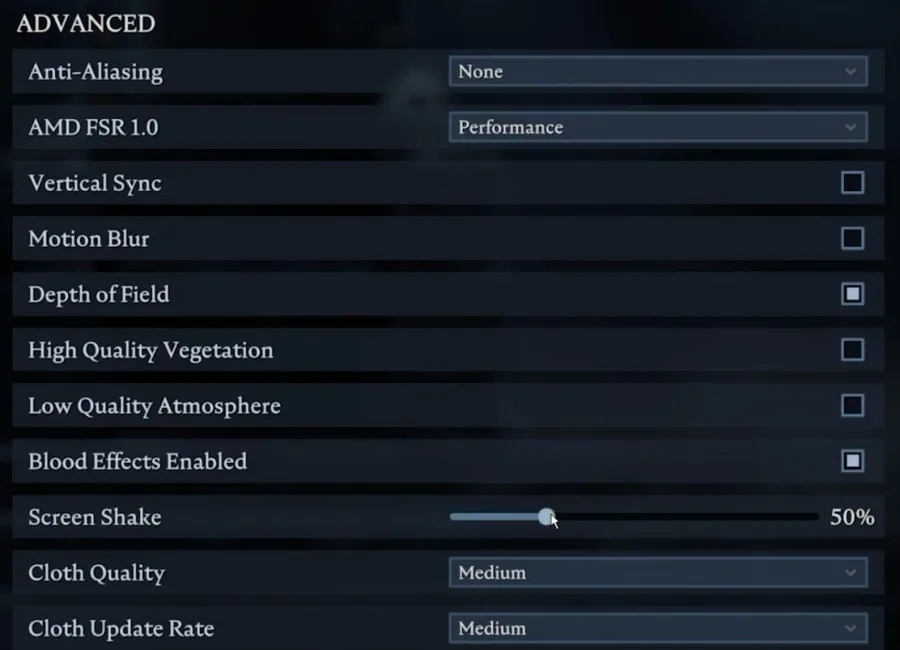
In your Advanced Graphics settings, make sure to disable Anti-Aliasing altogether. Playing V Rising on a lower screen refresh rate can make your game look laggier. I prefer to disable Motion Blur, but this will come down to personal preference. Leave Depth of Field enabled, disable High-Quality Atmosphere and enable or disable Blood Effects Enabled. Lastly, I prefer to lower the Screen Shake option to 50% and set the Cloth Quality and Cloth Update Rate to Medium. These two last settings can have a lot of impact on your graphics card (GPU) performance. If you notice any lag, then lower the Cloth Quality setting to Low first.
Video walkthrough
If it does not work
- If the current interface differs, compare it with the recorded video walkthrough.