
Productivity · Platform not recorded
How To Use A Free & Disposable Email Address - Tutorial
Original source date
Answer
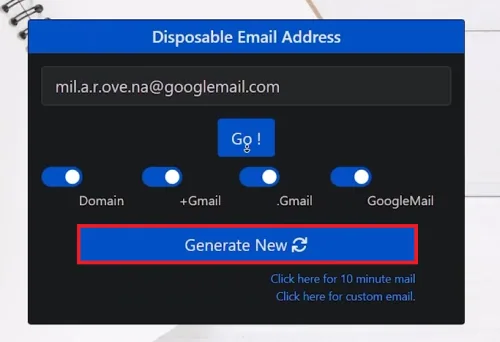
Visit EmailNator:Open your web browser and go to EmailNator.; Open your web browser and go to EmailNator.; Generate Your Temporary Email:Click on the ‘Generate New’ button to instantly create a disposable Gmail address.; Click on the ‘Generate New’ button to instantly create a disposable Gmail address.; Use Your Disposable Email:Copy the generated email address and use it for any sign-ups, newsletters, or online services where you prefer not to use your main email.; Copy the generated email address and use it for any sign-ups, newsletters, or online services where you prefer not to use your main email.
Steps to Generate a Disposable Email with EmailNator:
Visit EmailNator:Open your web browser and go to EmailNator.; Open your web browser and go to EmailNator.; Generate Your Temporary Email:Click on the ‘Generate New’ button to instantly create a disposable Gmail address.; Click on the ‘Generate New’ button to instantly create a disposable Gmail address.; Use Your Disposable Email:Copy the generated email address and use it for any sign-ups, newsletters, or online services where you prefer not to use your main email.; Copy the generated email address and use it for any sign-ups, newsletters, or online services where you prefer not to use your main email.
Accessing Your Temporary Email Inbox:
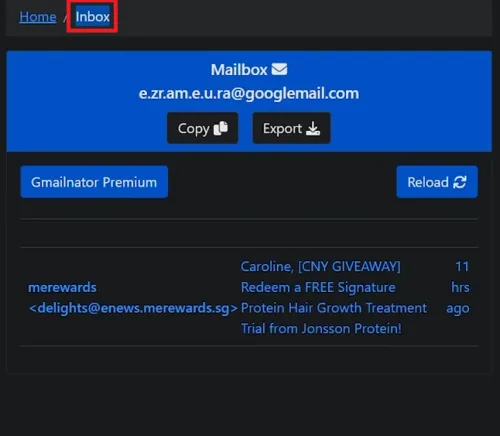
Return to EmailNator:Go back to the EmailNator website.; Go back to the EmailNator website.; Enter Your Disposable Email:Input the disposable email address you generated to access your inbox.; Input the disposable email address you generated to access your inbox.; Complete Verifications:Find any verification emails or communications from the services you signed up for and follow the necessary steps to activate the services.; Find any verification emails or communications from the services you signed up for and follow the necessary steps to activate the services.
Understanding EmailNator's Expiry Policy
Automatic Deactivation:Disposable email addresses automatically deactivate after 24 hours, ensuring your privacy.; Disposable email addresses automatically deactivate after 24 hours, ensuring your privacy.; Email Backup Duration:Emails are backed up for seven days after deactivation, allowing you to retrieve important information if needed.; Emails are backed up for seven days after deactivation, allowing you to retrieve important information if needed. Using EmailNator helps keep your primary inbox free from spam and unwanted emails, making it perfect for temporary online activities.
Video walkthrough
If it does not work
- How do I create a disposable email address with EmailNator?. Simply visit emailnator.com, and click on ‘Generate New’ to instantly receive a free, disposable email address without needing to register.
- Can I use EmailNator for email verification on sign-up pages?. Yes, EmailNator's disposable email addresses are designed to bypass most sign-up filters, making them suitable for email verifications on various websites.
- How long does an EmailNator disposable email address last?. An EmailNator disposable email address is active for 24 hours. After this period, the email address is automatically deactivated.
- Are emails received by my EmailNator address accessible after deactivation?. Yes, emails received by your EmailNator address are backed up and can be viewed for an additional seven days after the address is deactivated.
- Is it safe to use EmailNator for signing up for services online?. Using EmailNator is a secure way to protect your primary email from spam when signing up for online services, trials, or newsletters, as long as it's used responsibly and ethically.