
Windows 11 · Windows
Fix a USB Wi-Fi adapter in Windows
Source-checked About 10 minutes
Answer
Reconnect the adapter directly, run the Network and Internet troubleshooter, then update or reinstall its official driver. A VPN does not repair missing adapter hardware.
Isolate the connection, adapter, or service involved
Record whether the failure affects Wi-Fi, Ethernet, Airplane mode, one adapter, one app, or every device on the same network. Note the adapter model, connection status, exact error, and whether a known-good cable, port, network, or device works. Save VPN and organization settings before a reset, and avoid generic driver packages or broad network changes before the narrower checks.
Start with the supported check
Unplug the adapter, restart the PC, and reconnect it directly to another USB port without a hub.
Apply the current setting
Open Get Help and run the Network and Internet troubleshooter.
Confirm that Windows detects the adapter
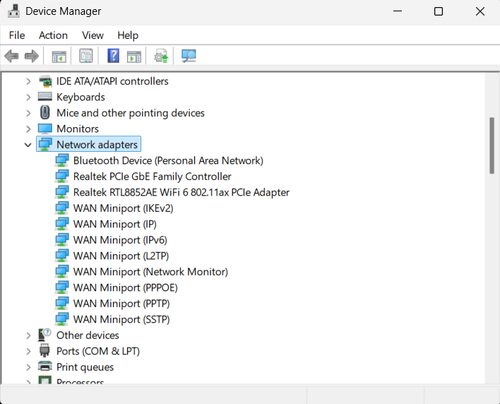
Open Device Manager and expand Network adapters and Universal Serial Bus controllers. If the adapter appears with a warning symbol, record its device status and hardware ID before changing the driver. If it never appears, test another direct USB port and another computer where possible; that separates a Windows configuration problem from a failed adapter or USB connection.
Test the result
In Device Manager, enable the adapter if disabled, then update or uninstall it and restart. Use the PC or adapter maker's official driver when Windows has none.
Verify the intended result before broader recovery
Repeat the exact task described by “Fix a USB Wi-Fi adapter in Windows” with a harmless test. Confirm the affected app, account, device, file or setting now matches the Answer, then recheck it after one fresh session or restart when that is part of the supported workflow. Keep the original data and recorded starting state until the result is stable; if only one component still fails, keep further recovery limited to that component.
Optional affiliate links
Affiliate disclosure: these preserved source links may earn Tech How a commission at no additional cost to you. They are optional and do not replace the supported procedure above.
Video walkthrough
If it does not work
- If the adapter remains absent, compare another USB port and PC, note its hardware ID, and install only the exact manufacturer or Windows Update driver. Repeated disconnects, overheating or failure on another PC indicate hardware or power trouble rather than a reason for generic network resets.
Sources and verification
Checked against official documentation on . Scope: Windows.
Follow the linked first-party guidance if labels differ after a platform update.