
Gaming · Windows
Fix Missing Sound in a Steam Game
Source-checked About 10 minutes
Answer
While the silent game is running, check its own Audio or Sound menu, then Windows' selected output and the game's row in Volume mixer. If other apps are also silent, use Windows audio troubleshooting instead. Steam's file verifier can repair a game-specific installation problem, but it cannot fix a muted app, wrong output, or disconnected device.
Find the affected scope
Keep the silent game running and play audio in a known-good non-Steam app. If only the game is silent, continue with its controls; if both are silent, go to the Windows-wide troubleshooting step.
Check the game's audio menu
Open the game's Settings or Options > Audio or Sound, unmute its master volume, and select the intended output if the game offers that control. Apply the change, return to gameplay, and test a sound.
Select the Windows output
Select the Speakers area on the taskbar, open the arrow beside the volume slider, and choose the intended speakers or headset. Fully exit and relaunch the game so it can detect the selected device.
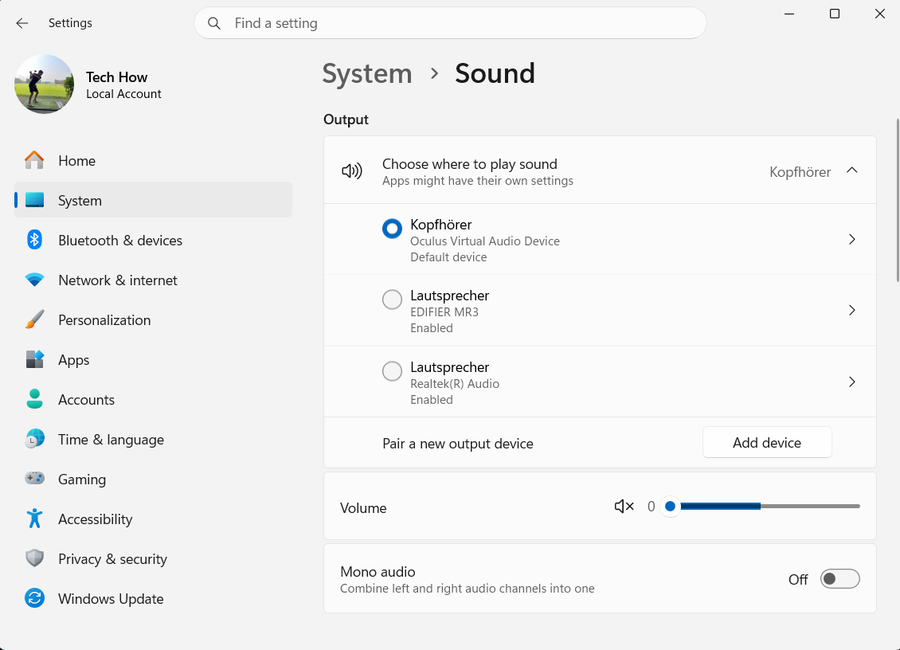
Unmute the game in Volume mixer
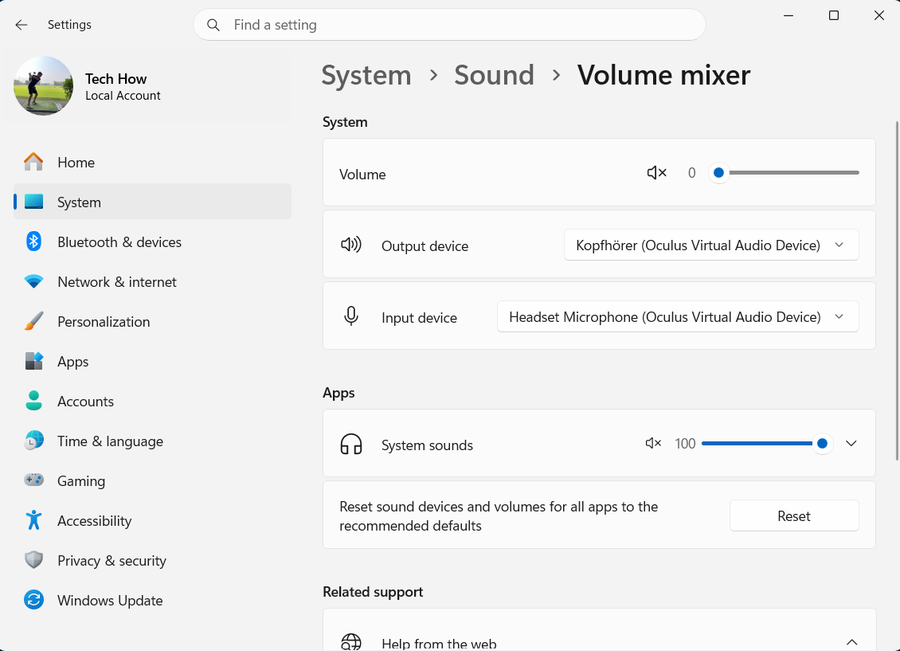
With the game still running, open Settings > System > Sound > Volume mixer. Under Apps, find the game, unmute it, raise its slider, and confirm its output route if that control appears, then test before using Reset.
Verify the installed game files
If only this game remains silent, open Steam Library, right-click the game or select its gear, then choose Properties > Installed Files > Verify integrity of game files. Wait for Steam to finish before launching the game; Steam notes that some local configuration files can fail verification normally.
Use Windows audio repair only for a system-wide fault
If the game and other apps are silent, open Get Help and run the Audio troubleshooter. If it cannot resolve the fault, install Windows updates and follow Microsoft's audio-driver guidance; do not make these broad changes first when only one game is affected.
Verify sound in gameplay
Return to the same scene or menu that was silent and confirm that game audio plays through the intended device. Reopen Volume mixer and verify that the game's row is still unmuted.
Video walkthrough
If it does not work
- If the game does not appear under Apps in Volume mixer, keep it running and trigger a sound before checking again.
- If you changed the output while the game was open, fully exit and relaunch it; some games detect audio devices only when they start.
- If a Bluetooth, USB, or HDMI device is missing from Windows, follow the device-specific Windows audio branch rather than reinstalling the game.
- If only one game remains silent after verification, preserve saves, mods, and publisher-specific configuration, then contact its publisher with the game version and output-device name.
Sources and verification
Checked against official documentation on . Scope: Windows.
Follow the linked first-party guidance if labels differ after a platform or app update.