
Windows 11 · Windows
How To Fix Slow Download Speed on Steam Launcher
Original source date
Answer
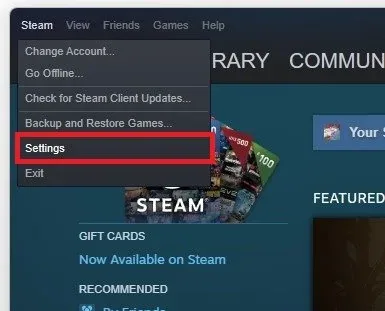
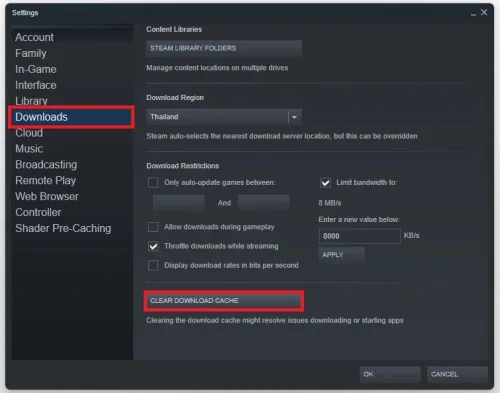
Take a look at your Steam settings. Open your Steam client and click Steam on the top left to access your settings. In the Downloads section, click on Clear Download Cache. This can have a lot of impact on your download speed, especially if you haven’t cleared your download cache before.
Adjust the Steam Download Settings
Take a look at your Steam settings. Open your Steam client and click Steam on the top left to access your settings.
Clear the Steam Download Cache
In the Downloads section, click on Clear Download Cache. This can have a lot of impact on your download speed, especially if you haven’t cleared your download cache before.
Next, change your Steam download region
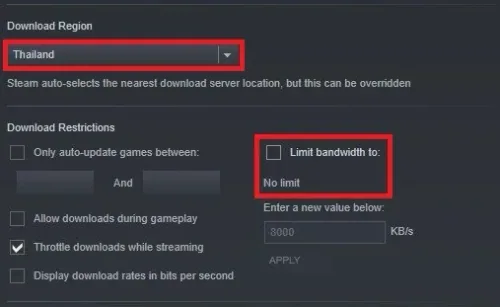
Next, change your Steam download region. The closest region is not always the best option, as some servers have a higher or lower utilization depending on the time of day. Additionally, prevent your VPN service from running on your system, as this will in any case reduce download speeds for Steam games. You should also disable or increase your download bandwidth limit. I have set this to 5 or 8 mb/s, but if you prefer to increase your download speed, then make sure to disable the limit.
End Network-Intensive Tasks
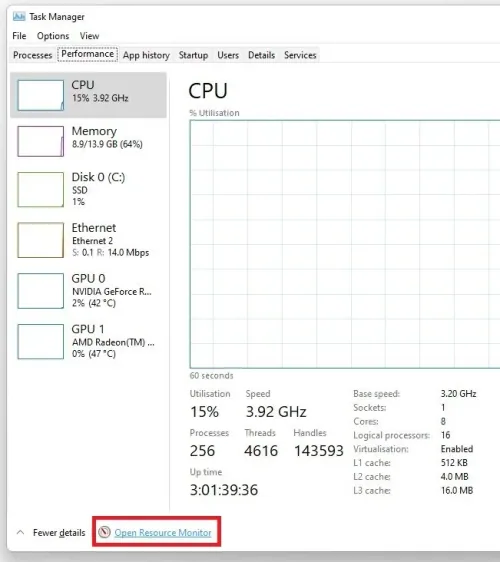
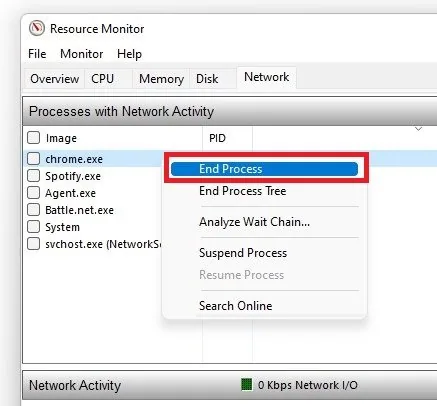
Close your Steam client and open your Task Manager by searching for it in your start menu search. In the Performance tab, select Open Resource Monitor.
In the Network section, expand your Processes with Network Activity
In the Network section, expand your Processes with Network Activity. After a few seconds, you will see every process using your network connection. This might be your browser running in the background, Discord, or a download bottlenecking your connection. Make sure only to end the processes you know won’t break your operating system.
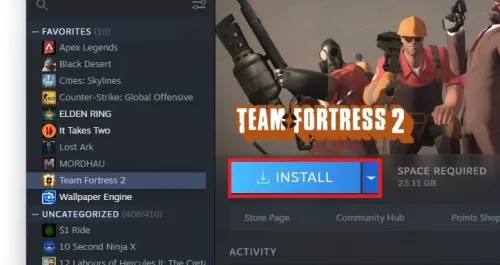
Change the Download Location
Before downloading new content in your Steam client, you should see an option to where to install the content to. If you have enough storage on your SSD, you might want to install it to a faster drive, as your write speeds might otherwise bottleneck your download speed.
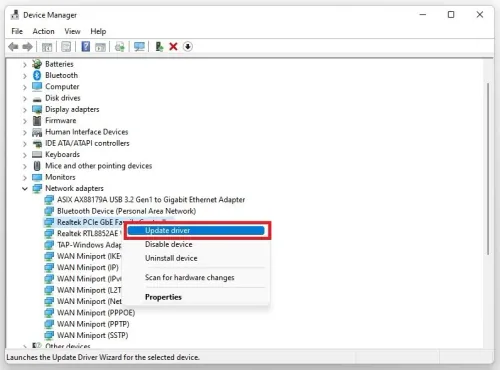
Update Network Adapter Driver
Ensure your network adapter driver is up to date. Open up your Device Manager. On this window, expand your Network Adapters, right-click the one you are using, and select Update Driver. Lastly, select Search automatically for drivers. This will take a moment to ensure that your network adapter’s driver is up to date.
Lastly, and this might sound obvious to some of you, use an ethernet connection t…
Lastly, and this might sound obvious to some of you, use an ethernet connection to get a faster and more reliable connection to your router and restart your router in case you haven’t done this in a while.
Video walkthrough
If it does not work
- Why is Steam download speed so slow?. Slow download speed on Steam can be caused by a variety of reasons, such as network congestion, outdated software, incorrect settings, or server overload.
- How can I check my internet connection speed?. You can use online tools such as Speedtest.net or Fast.com to check your internet connection speed. Make sure to test your connection speed at different times of the day to get a clear picture of its stability.
- What should I do if Steam downloads are stuck?. If your Steam downloads are stuck, try the following solutions: Pause and resume the download Restart Steam Change the download server location Clear the download cache Verify the integrity of the game files