
Productivity · Platform not recorded
How To Share VPN Connection with Friends for Free - PrivadoVPN Guide
Original source date
Answer
Installing PrivadoVPN: Choose the Right Plan: PrivadoVPN offers free and premium plans. Use the promotional link for a discount and three months of free service.; Download and Install:For desktop (macOS, Windows, Linux): Visit the PrivadoVPN website, sign up, and download the app for your OS.For mobile (iOS, Android): Download the PrivadoVPN app from the App Store or Google Play Store.; For desktop (macOS, Windows, Linux): Visit the PrivadoVPN website, sign up, and download the app for your OS.; For mobile (iOS, Android): Download the PrivadoVPN app from the App Store or Google Play Store. Advantages: Encrypts internet traffic and masks IP addresses.; Access geo-restricted content and enhance privacy.; Compatible with various devices including gaming consoles and smart TVs.; Blocks ads and offers servers in 48 countries and 65 cities.; Easy to install and use.
How to Install PrivadoVPN on Your Devices
Installing PrivadoVPN: Choose the Right Plan: PrivadoVPN offers free and premium plans. Use the promotional link for a discount and three months of free service.; Download and Install:For desktop (macOS, Windows, Linux): Visit the PrivadoVPN website, sign up, and download the app for your OS.For mobile (iOS, Android): Download the PrivadoVPN app from the App Store or Google Play Store.; For desktop (macOS, Windows, Linux): Visit the PrivadoVPN website, sign up, and download the app for your OS.; For mobile (iOS, Android): Download the PrivadoVPN app from the App Store or Google Play Store. Advantages: Encrypts internet traffic and masks IP addresses.; Access geo-restricted content and enhance privacy.; Compatible with various devices including gaming consoles and smart TVs.; Blocks ads and offers servers in 48 countries and 65 cities.; Easy to install and use.
Configuring Your VPN Connection with PrivadoVPN
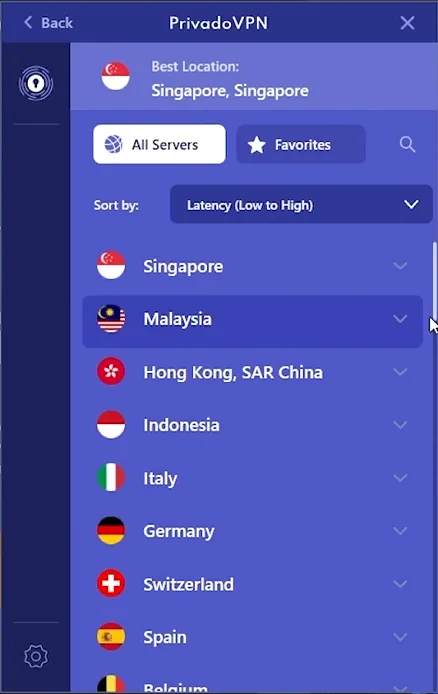
Setting Up PrivadoVPN: Open PrivadoVPN App: Launch the app on your device.; Log In: Enter your account details.; Activate VPN: Click the power button in the app to turn on the VPN.; Select Location: Choose a server from the available countries and cities. Testing Connection Speed: Use Speedtest.net or Fast.com to check your internet speed with the VPN active.
Enabling Mobile Hotspot for VPN Sharing
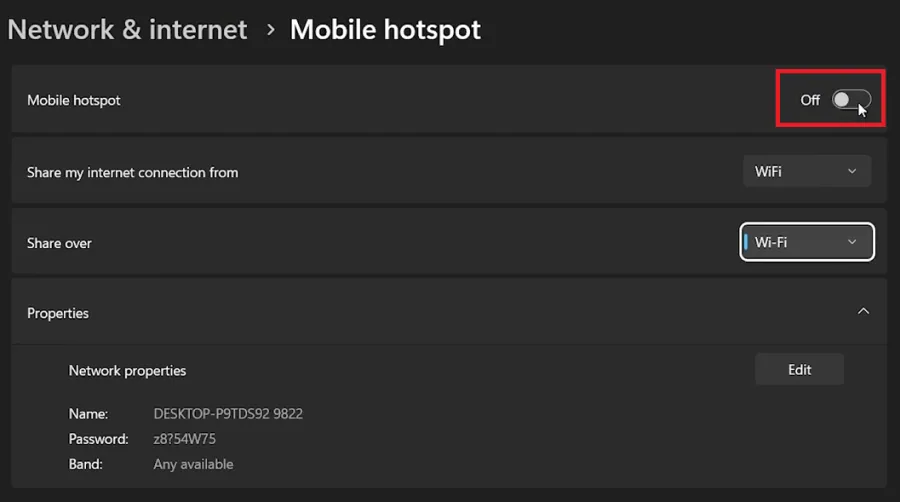
Sharing VPN Connection via Mobile Hotspot: Access Control Center: Click the control center icon on your taskbar.; Enable Mobile Hotspot:If visible, click to turn it on.If not, search 'mobile hotspot' in the Start Menu and select it.; If visible, click to turn it on.; If not, search 'mobile hotspot' in the Start Menu and select it.; Configure Hotspot Settings: Toggle on the feature in the Mobile Hotspot settings window. Impact on Shared Connection: Devices connected to your hotspot will use the VPN-protected internet through the selected location in the PrivadoVPN app, extending VPN protection to them as well.
Affiliate Disclaimer: Please note that the link provided for PrivadoVPN is an aff…
Affiliate Disclaimer: Please note that the link provided for PrivadoVPN is an affiliate link. By using this link, you can access special offers, and we may receive a commission at no extra cost to you. This helps support our website and allows us to continue providing valuable content.
Video walkthrough
If it does not work
- Can I share my PrivadoVPN connection with friends?. Yes, you can share your PrivadoVPN connection via a mobile hotspot, allowing friends to benefit from the same secure and encrypted connection.
- How do I set up a mobile hotspot to share my VPN connection?. Access the mobile hotspot option in your device's control center or through the Start Menu. Enable it to share your VPN-protected internet connection.
- Will sharing my VPN connection slow down my internet speed?. Sharing your VPN connection may slightly reduce internet speed due to encryption and routing processes, but PrivadoVPN ensures minimal speed loss.
- Can devices connected to my hotspot access geo-restricted content?. Yes, devices connected to your hotspot will have access to geo-restricted content based on the VPN server location you’ve selected in PrivadoVPN.
- Is it secure to share my VPN connection with others?. Sharing a VPN connection is secure as it encrypts the internet traffic for all connected devices, maintaining privacy and security.