
Social Media · Platform not recorded
How To See Deleted Friends on Snapchat - Preview Removed Friends
Original source date
Answer
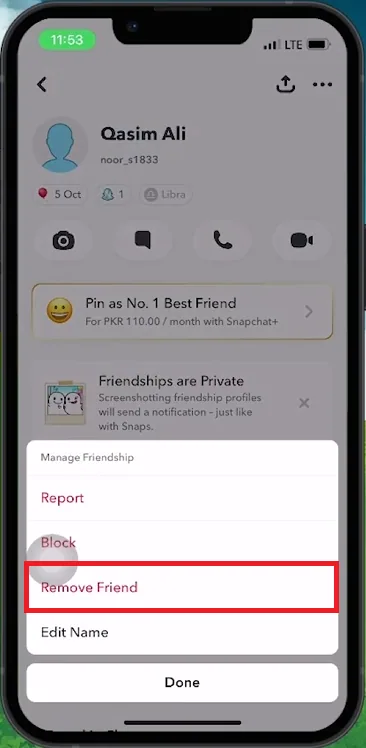
Steps to Delete a Snapchat Friend: Open Snapchat:Launch the Snapchat app on your device.; Launch the Snapchat app on your device.; Access Friends List:Tap on your profile icon (upper left corner).Scroll to find the “My Friends” section.; Tap on your profile icon (upper left corner).; Scroll to find the “My Friends” section.; Select Friend to Remove:Browse your friends list.Open the chat of the friend you want to remove.; Browse your friends list.; Open the chat of the friend you want to remove.; Remove Friend:Tap on their name at the top.Click on the three dots (upper right corner).Choose “Manage Friendship”.Select “Remove Friend”.Confirm by tapping “Remove” again.; Tap on their name at the top.; Click on the three dots (upper right corner).; Choose “Manage Friendship”.; Select “Remove Friend”.; Confirm by tapping “Remove” again.
Removing a Friend on Snapchat
Steps to Delete a Snapchat Friend: Open Snapchat:Launch the Snapchat app on your device.; Launch the Snapchat app on your device.; Access Friends List:Tap on your profile icon (upper left corner).Scroll to find the “My Friends” section.; Tap on your profile icon (upper left corner).; Scroll to find the “My Friends” section.; Select Friend to Remove:Browse your friends list.Open the chat of the friend you want to remove.; Browse your friends list.; Open the chat of the friend you want to remove.; Remove Friend:Tap on their name at the top.Click on the three dots (upper right corner).Choose “Manage Friendship”.Select “Remove Friend”.Confirm by tapping “Remove” again.; Tap on their name at the top.; Click on the three dots (upper right corner).; Choose “Manage Friendship”.; Select “Remove Friend”.; Confirm by tapping “Remove” again.
Locating Deleted Friends on Snapchat
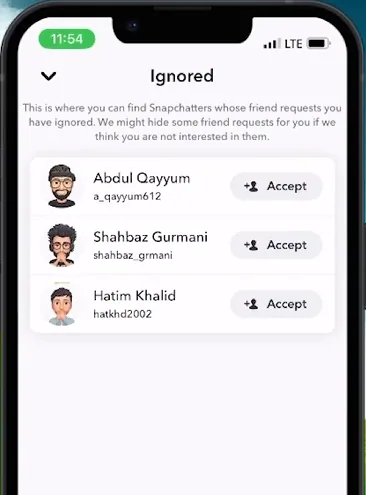
Steps to Find and Re-add Removed Friends: Check Removal Confirmation:Ensure the friend is removed from your contacts.; Ensure the friend is removed from your contacts.; Access 'Add Friends':Go to the main menu.Tap on the chat icon.Select the “plus add friend” icon (upper right corner).; Go to the main menu.; Tap on the chat icon.; Select the “plus add friend” icon (upper right corner).; Find Removed Friend:In 'Add Friends', tap on the three dots (upper right).Choose “Ignore from Added Me”.See the list of deleted friends.; In 'Add Friends', tap on the three dots (upper right).; Choose “Ignore from Added Me”.; See the list of deleted friends.
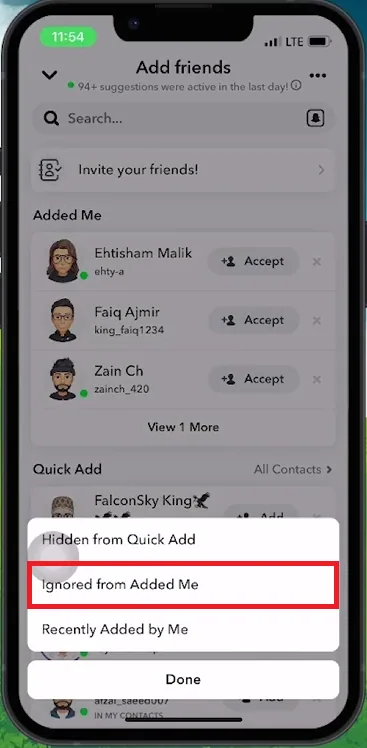
Re-add Friend (Optional): If they appear in the list, tap on “accept” to re-add them
Re-add Friend (Optional): If they appear in the list, tap on “accept” to re-add them. Troubleshooting: If the friend doesn't appear initially, restart the Snapchat app and recheck the “Ignore from Added Me” list. By following these steps, you can easily manage your Snapchat friends and keep track of those you've removed.
Video walkthrough
If it does not work
- Can I see a list of friends I've deleted on Snapchat?. Yes, you can view deleted friends under the "Ignore from Added Me" section in the 'Add Friends' area.
- How do I access my deleted friends list on Snapchat?. Go to 'Add Friends', tap the three dots, and select “Ignore from Added Me”.
- What if the deleted friend doesn't appear in the list?. Restart Snapchat and check the list again. Sometimes, the app needs to refresh to update the list.
- Can I re-add a friend I previously removed on Snapchat?. Yes, if they appear in the "Ignore from Added Me" list, simply tap “accept” to re-add them.
- Will the re-added friend know I had deleted them?. Snapchat does not notify users when they are deleted or re-added.