
Gaming · Windows
How To Fix Roblox Error “Teleport Failed” - Code 773 Fix (PC)
Original source date
Answer
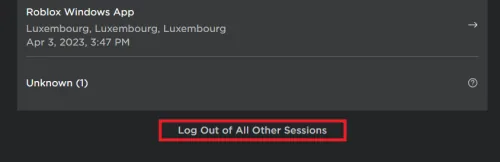
Experiencing the Roblox "Teleport Failed" error is indeed disheartening, but the solution can often be as straightforward as managing your Roblox sessions. Frequent instances of this error can stem from being logged into Roblox on multiple devices or sessions simultaneously. Let's walk through the steps to resolve this: Begin by launching your Roblox application.; Look for the gear icon, usually positioned towards the right of the app interface. This icon leads you to the settings.; Upon clicking the gear icon, a dropdown menu appears. From the options available, select "Settings."; In the settings panel, you'll find the "Log Out" button. Click on it.; A crucial step here is to confirm that you're signed out from all Roblox accounts on all devices.
Managing Roblox Sessions to Overcome Error 773
Experiencing the Roblox "Teleport Failed" error is indeed disheartening, but the solution can often be as straightforward as managing your Roblox sessions. Frequent instances of this error can stem from being logged into Roblox on multiple devices or sessions simultaneously. Let's walk through the steps to resolve this: Begin by launching your Roblox application.; Look for the gear icon, usually positioned towards the right of the app interface. This icon leads you to the settings.; Upon clicking the gear icon, a dropdown menu appears. From the options available, select "Settings."; In the settings panel, you'll find the "Log Out" button. Click on it.; A crucial step here is to confirm that you're signed out from all Roblox accounts on all devices.
Ensure Roblox Game is Up-to-date
Maintaining updated Roblox games is pivotal for a seamless and error-free gaming journey. Compatibility issues, including the persistent "Teleport Failed" error, can often be traced back to outdated game versions. Let's navigate through the steps to ensure your Roblox game is updated: Initiate the Roblox app on your device.; Navigate towards the "My Games" section, typically located in the app interface.; Now, search for the specific game where you've encountered the "Teleport Failed" error.; Spot the three-dot menu adjacent to the game title. Click on it to explore more options.; If there's an update available, you'll see the "Update" option. Click on it and patiently wait for the update process to conclude. By ensuring your Roblox game version is the latest, you'll not only potentially fix the "Teleport Failed" error but also enhance your overall gaming experience with the latest features and fixes.
Employ a VPN for Location-Specific Issues
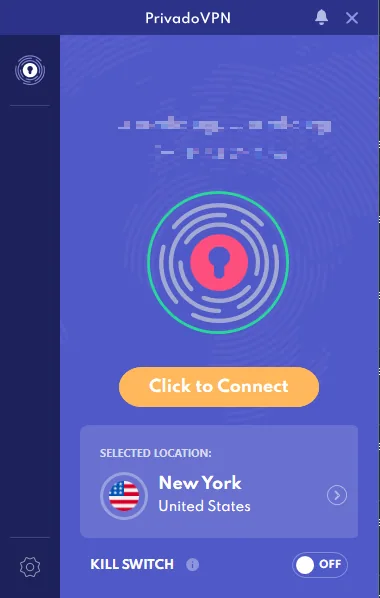
A clever method to tackle the "Teleport Failed" error in Roblox is by harnessing the power of a Virtual Private Network (VPN) such as PrivadoVPN. Sometimes, the error arises due to geographical restrictions imposed on certain games. Here's how you can use a VPN to your advantage: Install a reliable VPN application, for instance, PrivadoVPN, on your device.; Launch the VPN and select a server location that meets the game's requirements.; Enable the VPN to change your virtual location. Through the VPN, your connection reroutes, allowing you to virtually relocate and potentially circumvent location-based restrictions, thereby resolving the "Teleport Failed" error. Remember, while using a VPN, ensure you adhere to the Terms of Service provided by Roblox to avoid any unnecessary complications.
Try Individual Teleportation
A specific trigger for the "Teleport Failed" error in Roblox might be group teleportation. If you're facing this issue while trying to teleport in a group, considering going solo could be the solution. Often, game servers may struggle with group teleport requests, leading to errors. Here's how you can teleport individually: Launch the Roblox game you're playing.; Access the in-game menu or chat.; Choose the option to teleport individually. By following these steps, you bypass the group teleportation feature that may be causing the issue, and this method could potentially help you teleport successfully. Remember, each game might have a slightly different interface, so the option to teleport individually might be located in different sections of the menu.
Video walkthrough
If it does not work
- Why am I seeing the 'Teleport Failed' error on Roblox?. The 'Teleport Failed' error in Roblox is often caused by factors such as being logged into multiple Roblox sessions, outdated game versions, geographic restrictions, or attempting to teleport as a group.
- How do I log out of all Roblox sessions to fix the 'Teleport Failed' error?. To log out of all Roblox sessions, open the Roblox app, click the gear icon to access your settings, and select 'Settings' from the dropdown menu. In the settings menu, click on the 'Log Out' button.
- How do I update my Roblox game to avoid the 'Teleport Failed' error?. Open the Roblox app, go to the 'My Games' tab, find the game where you're experiencing the error, and click on the three-dot menu. If an update is available, select 'Update' and wait for it to complete before attempting to teleport again.
- Can using a VPN help fix the 'Teleport Failed' error in Roblox?. Yes, using a VPN like PrivadoVPN can potentially bypass geographic restrictions that might trigger the 'Teleport Failed' error. The VPN changes your virtual location, allowing you to play games without location-based issues.
- Why does the 'Teleport Failed' error occur when I try to teleport as a group in Roblox?. Sometimes, Roblox servers can struggle with group teleport requests, causing the 'Teleport Failed' error. Teleporting individually instead can often bypass this issue.