
Social Media · Platform not recorded
How To Remove End to End Encryption in Messenger
Original source date
Answer
Secret Conversations: Uses end-to-end encryption.; Ensures messages can only be read by you and the recipient.; Identified by a lock icon next to the person's name. Regular Chats: Do not use end-to-end encryption by default.; More accessible across multiple devices.
Understanding Encryption in Messenger
Secret Conversations: Uses end-to-end encryption.; Ensures messages can only be read by you and the recipient.; Identified by a lock icon next to the person's name. Regular Chats: Do not use end-to-end encryption by default.; More accessible across multiple devices.
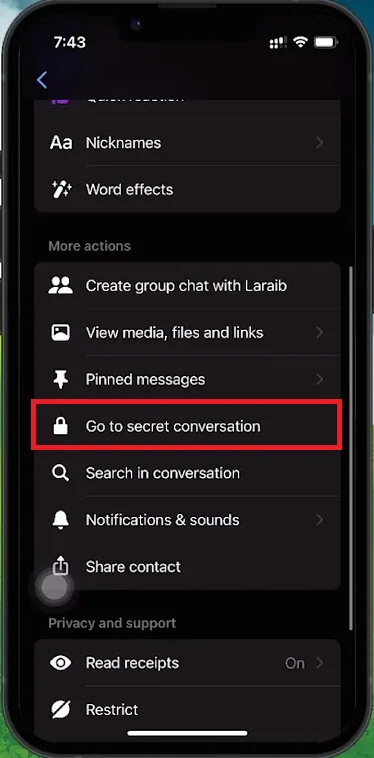
How to Disable Encryption
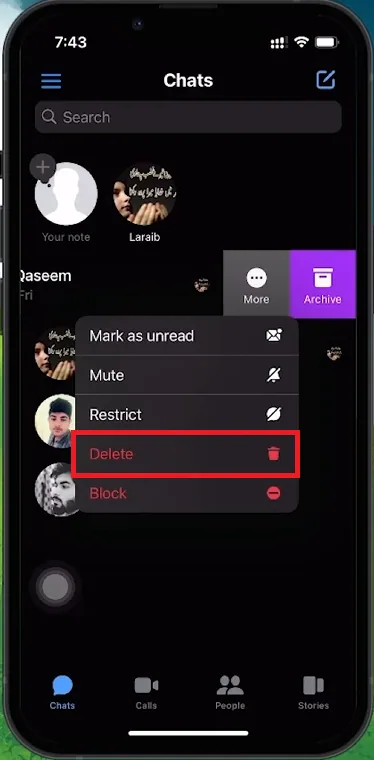
Switching from Secret to Regular Conversations: Identify Secret Conversations:Look for the lock icon next to the contact's name.; Look for the lock icon next to the contact's name.; End the Encrypted Chat:You cannot simply turn off encryption in an ongoing Secret Conversation.You need to delete the Secret Conversation first.; You cannot simply turn off encryption in an ongoing Secret Conversation.; You need to delete the Secret Conversation first.; Delete the Secret Conversation:Swipe left on the chat.Tap the three dots (more options).Select 'Delete' to remove the conversation.Note: This action is irreversible, so save any important information before deleting.; Swipe left on the chat.; Tap the three dots (more options).; Select 'Delete' to remove the conversation.; Note: This action is irreversible, so save any important information before deleting.; Start a Regular Chat:After deleting the Secret Conversation, search for the contact again.Initiate a new chat, which will be in regular mode without end-to-end encryption.; After deleting the Secret Conversation, search for the contact again.; Initiate a new chat, which will be in regular mode without end-to-end encryption.
Video walkthrough
If it does not work
- How do I delete a Secret Conversation on Messenger?. To delete a Secret Conversation, swipe left over the chat, tap on the three dots to open the menu, select 'Delete', and confirm the action. This process permanently removes the encrypted chat from your Messenger.
- Can I recover a deleted Secret Conversation?. No, once a Secret Conversation is deleted, it cannot be recovered. It's important to save any essential information before deleting the chat.
- How do I start a new, regular chat after deleting a Secret Conversation?. After deleting a Secret Conversation, return to the Messenger home screen, search for the contact's name, and tap to initiate a new chat. This conversation will be in regular mode, without end-to-end encryption.
- Will the other person know if I delete our Secret Conversation?. Messenger does not notify the other person when you delete a Secret Conversation. However, the chat will also disappear from their conversation list.
- What are the benefits and drawbacks of switching from Secret to regular conversations?. Switching to regular conversations allows easier access to messages across multiple devices and might enable additional features. However, it sacrifices the high level of privacy and security provided by end-to-end encryption, making your messages less secure.