
Windows 11 · Windows
How To Remove/Recover ZIP File Password - Easy Tutorial
Original source date
Answer
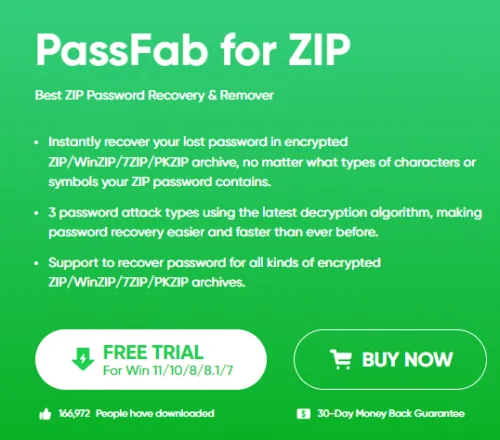
Regaining access to a password-protected ZIP file is straightforward with PassFab for ZIP. Here's how to do it: Download the Software:Visit the PassFab for ZIP website.Locate and click on the download option to start downloading the software.; Visit the PassFab for ZIP website.; Locate and click on the download option to start downloading the software.; Install PassFab for ZIP:Once downloaded, run the installer and follow the on-screen prompts to install the software on your computer.; Once downloaded, run the installer and follow the on-screen prompts to install the software on your computer.
How to Recover a ZIP File Password with PassFab for ZIP
Regaining access to a password-protected ZIP file is straightforward with PassFab for ZIP. Here's how to do it:
Downloading and Installing PassFab for ZIP
Download the Software:Visit the PassFab for ZIP website.Locate and click on the download option to start downloading the software.; Visit the PassFab for ZIP website.; Locate and click on the download option to start downloading the software.; Install PassFab for ZIP:Once downloaded, run the installer and follow the on-screen prompts to install the software on your computer.; Once downloaded, run the installer and follow the on-screen prompts to install the software on your computer.
Uploading Your ZIP File
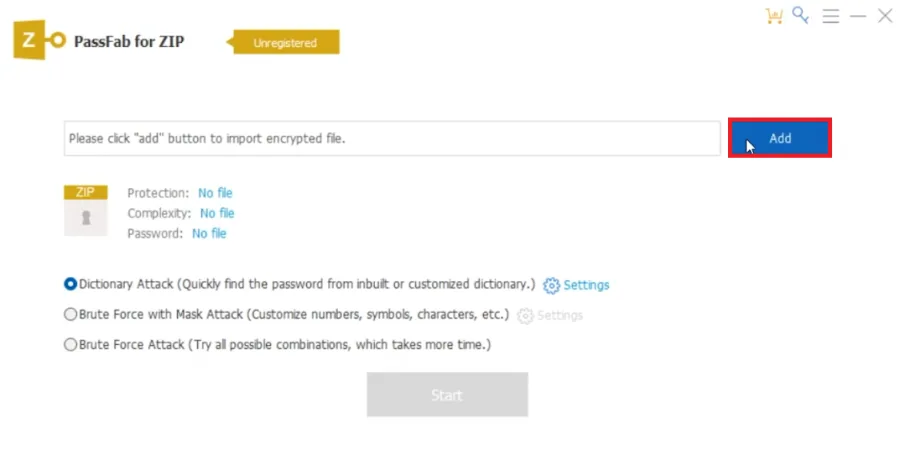
Launch PassFab for ZIP: Open the software to find an easy-to-use interface.; Upload Your File: Click on the 'Add' button to upload the ZIP file you need to access.
Choosing a Recovery Method
Select a Recovery Technique:PassFab for ZIP offers several methods:Dictionary Attack: Useful if your password might be a common word or phrase.Brute Force with Mask Attack: Ideal if you remember specific details about your password (like length or some characters).Brute Force Attack: Choose this when you have no clue about the password.; PassFab for ZIP offers several methods:Dictionary Attack: Useful if your password might be a common word or phrase.Brute Force with Mask Attack: Ideal if you remember specific details about your password (like length or some characters).Brute Force Attack: Choose this when you have no clue about the password.; Dictionary Attack: Useful if your password might be a common word or phrase.; Brute Force with Mask Attack: Ideal if you remember specific details about your password (like length or some characters).; Brute Force Attack: Choose this when you have no clue about the password.
Customizing the Recovery
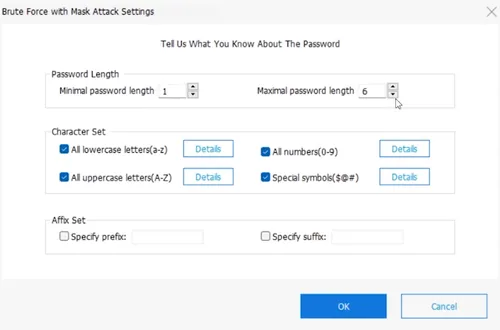
Fine-Tune the Recovery Settings:Use the 'Settings' option to specify potential password features like length, character types, and known prefixes or suffixes. This customization can greatly accelerate the recovery process.; Use the 'Settings' option to specify potential password features like length, character types, and known prefixes or suffixes. This customization can greatly accelerate the recovery process.
Starting the Recovery and Accessing Your File
Initiate the Process: Click the 'Start' button to begin. Recovery time will depend on the password’s complexity.; Password Reveal: Once PassFab for ZIP cracks the password, it will display it on the screen. Note: This feature requires the registered version of the software.; Access Your File: With the password recovered, you can now open your ZIP file and access its contents. Always use such tools ethically, ensuring you have the rights to access the file you’re attempting to unlock.
Affiliate Disclosure for PassFab: Please note that this article includes affiliat…
Affiliate Disclosure for PassFab: Please note that this article includes affiliate links to PassFab products. If you click on these links and make a purchase, we may earn a commission at no additional cost to you. Our recommendation of PassFab's tools is based on their quality and relevance to our readers' needs, not on the potential commission.
Video walkthrough
If it does not work
- What is PassFab for ZIP?. PassFab for ZIP is a specialized software designed to remove or recover passwords from ZIP files. It offers different recovery methods to suit various situations.
- Can I recover a ZIP file password if I remember parts of it?. Yes, PassFab for ZIP allows customization in the recovery process. You can input known parts of your password, like length or characters, to tailor and speed up the recovery.
- How long does it take to recover a password with PassFab for ZIP?. The duration varies depending on the password's complexity and the chosen recovery method. Simple passwords are recovered faster, while complex ones take more time.
- What are the different methods available in PassFab for ZIP for password recovery?. PassFab for ZIP offers methods like Dictionary Attack, Brute Force with Mask Attack, and Brute Force Attack, each suitable for different types of passwords.
- Is it legal to use PassFab for ZIP to recover a ZIP file password?. It's legal to use PassFab for ZIP as long as you have the right to access the ZIP file. Always use such tools responsibly and for ethical purposes.