
Gaming · Platform not recorded
How To Show FPS in PUBG
Original source date
Answer
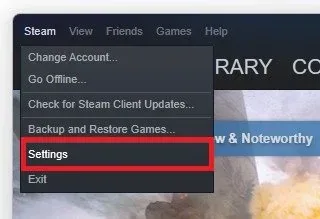
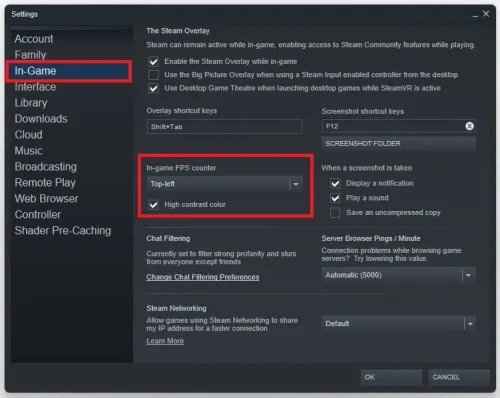
There are a lot of programs that can show an FPS counter, such as MSI Afterburner, NVIDIA Shadowplay, XSplit, Fraps, or the Steam overlay FPS counter. Open Steam, and click on Steam in the top left corner. Navigate to your Settings, and in the In-Game tab, set the In-game FPS counter to one of your four screen corners, and below, you can enable the high contrast color option, which will display the FPS counter in a bright green color. The next time you launch PUBG on Steam, you will notice an FPS counter in one of the screen corners you selected before.
Use the Steam FPS Counter Overlay
There are a lot of programs that can show an FPS counter, such as MSI Afterburner, NVIDIA Shadowplay, XSplit, Fraps, or the Steam overlay FPS counter. Open Steam, and click on Steam in the top left corner.
Navigate to your Settings, and in the In-Game tab, set the In-game FPS counter to…
Navigate to your Settings, and in the In-Game tab, set the In-game FPS counter to one of your four screen corners, and below, you can enable the high contrast color option, which will display the FPS counter in a bright green color. The next time you launch PUBG on Steam, you will notice an FPS counter in one of the screen corners you selected before.
Video walkthrough
If it does not work
- If the current interface differs, compare it with the recorded video walkthrough.