
Gaming · Windows & macOS
How To Play Family Island on PC & Mac
Original source date
Answer
To play Family Island on your PC, you must use an Android emulator, such as Bluestacks. Bluestacks is a popular choice to play mobile games on your PC, as it’s optimized for playing mobile games. This should take a second to complete, and you can follow the install wizard to install the application to your system.
Download & Install BlueStacks
To play Family Island on your PC, you must use an Android emulator, such as Bluestacks. Bluestacks is a popular choice to play mobile games on your PC, as it’s optimized for playing mobile games. This should take a second to complete, and you can follow the install wizard to install the application to your system.
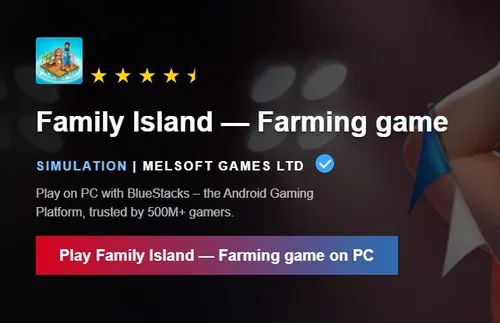
Download Family Island
When the installation is complete, the Bluestacks emulator should open up automatically. Next, click here to access the Family Island download page. This will re-open your Bluestacks application, and the game’s files will start downloading.
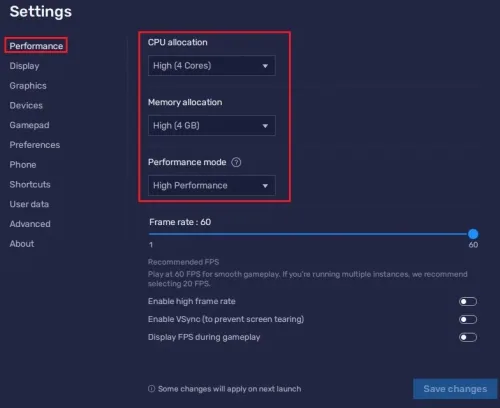
BlueStacks Performance Settings
While downloading the game, you should look at your emulator settings. Click on this gear icon to access these settings. In the Performance tab, you should set these according to your PC’s performance. Allocate a High amount of CPU cores if you don’t have a lot of other applications running in the background. The same goes for your Memory allocation. For users with 4GB or less RAM, set this option to Low. Under Performance Mode, make sure to set this option to Balanced. This will reduce the memory and CPU usage if your PC lags or you otherwise encounter low performance. I prefer to enable the high FPS option and set the frame rate of the emulator according to my screen refresh rate.
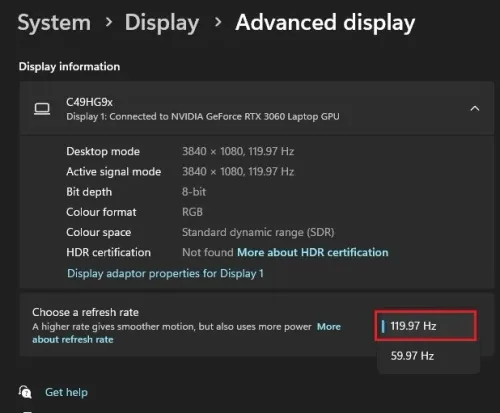
Windows Display Settings
If unsure about your refresh rate, right-click your desktop and select Display Settings. From here, make sure that the correct display is selected, scroll down, and click on Advanced Display. This will allow you to preview your refresh rate and change it if you want. Also, if you want to troubleshoot performance issues, then make sure to enable the FPS counter option.
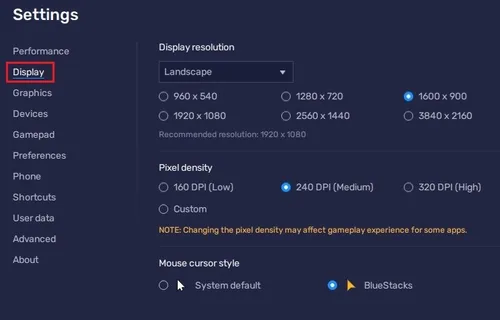
BlueStacks Display Settings
In your Display settings, I like to use a resolution of 1920 x 1080, but you can set this to anything you want. You can leave the other settings to their default option and play Family Island to see how well it runs on your PC.
Video walkthrough
If it does not work
- What is BlueStacks?. BlueStacks is an Android emulator that allows you to run Android apps on your PC or Mac.
- Is it legal to use BlueStacks to play Family Island on PC?. Yes, it is. BlueStacks is a legitimate app that is widely used by millions of people to play mobile games on their computers.
- Will I lose my progress if I switch from playing on my mobile to playing on PC using BlueStacks?. No, you won't. Your progress will be saved to the cloud, and you can continue from where you left off on any device.