
Productivity · Windows
How To Open a RAR File Without Password - Tutorial
Original source date
Answer
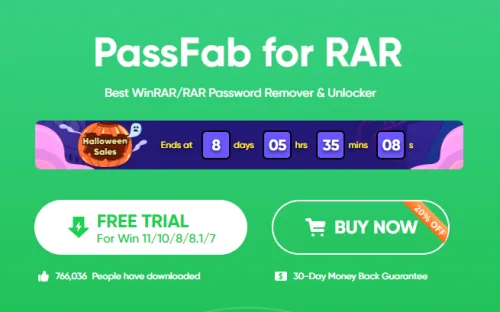
If you stumble upon a RAR file that's password-protected and the password slips your mind, don't worry. There are tools out there to help you get back or skip the password. One such trustworthy tool is "PassFab RAR Recovery." It’s made to find lost or forgotten passwords of RAR files. Follow these steps to get and use PassFab RAR Recovery: Navigate to PassFab for RAR Page:Go to the PassFab for RAR page.; Go to the PassFab for RAR page.; Download PassFab:Spot the download button on the page and click it to start the download.; Spot the download button on the page and click it to start the download.; Locate and Install:After the download, find the setup file in your downloads folder.Double-click the setup file and follow the simple instructions on the screen to install.; After the download, find the setup file in your downloads folder.; Double-click the setup file and follow the simple instructions on the screen to install.; Launch PassFab:Once installed, open PassFab RAR Recovery.You'll see a clear and simple interface, making it easy to start recovering your password.; Once installed, open PassFab RAR Recovery.; You'll see a clear and simple interface, making it easy to start recovering your password.
Download and Install PassFab
If you stumble upon a RAR file that's password-protected and the password slips your mind, don't worry. There are tools out there to help you get back or skip the password. One such trustworthy tool is "PassFab RAR Recovery." It’s made to find lost or forgotten passwords of RAR files. Follow these steps to get and use PassFab RAR Recovery: Navigate to PassFab for RAR Page:Go to the PassFab for RAR page.; Go to the PassFab for RAR page.; Download PassFab:Spot the download button on the page and click it to start the download.; Spot the download button on the page and click it to start the download.; Locate and Install:After the download, find the setup file in your downloads folder.Double-click the setup file and follow the simple instructions on the screen to install.; After the download, find the setup file in your downloads folder.; Double-click the setup file and follow the simple instructions on the screen to install.; Launch PassFab:Once installed, open PassFab RAR Recovery.You'll see a clear and simple interface, making it easy to start recovering your password.; Once installed, open PassFab RAR Recovery.; You'll see a clear and simple interface, making it easy to start recovering your password.
Extracting Password Using PassFab
Once you have PassFab RAR Recovery ready, follow these steps to retrieve the password of your RAR file: Load Your RAR File:Click the "Add" button.Find and select your password-protected RAR file to load it into the software.; Click the "Add" button.; Find and select your password-protected RAR file to load it into the software.; Choose Recovery Method:You'll see different recovery methods.Each method is for different kinds of situations, pick the one that fits your case.; You'll see different recovery methods.; Each method is for different kinds of situations, pick the one that fits your case.
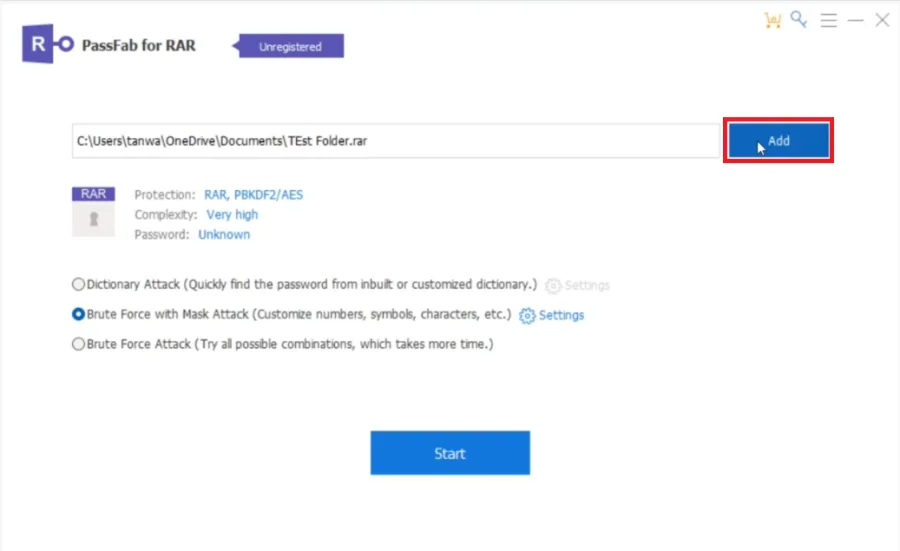
Start Password Recovery:Hit the "Start" button to begin finding the password.The…
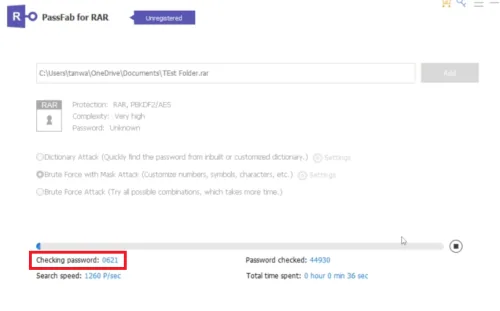
Start Password Recovery:Hit the "Start" button to begin finding the password.The time it takes depends on how complex the password is.; Hit the "Start" button to begin finding the password.; The time it takes depends on how complex the password is.; Retrieve and Use the Password:Once found, the password will show on the screen. Write it down.Now, use this password to open your RAR file and see what's inside.; Once found, the password will show on the screen. Write it down.; Now, use this password to open your RAR file and see what's inside.; Use Responsibly:It's important to use PassFab RAR Recovery the right way.Make sure you have the right to open the RAR file you're working on.; It's important to use PassFab RAR Recovery the right way.; Make sure you have the right to open the RAR file you're working on.; Explore Other Options if Needed:If PassFab RAR Recovery doesn't do the trick, there are other tools on the internet.Look around to find one that works for you and your RAR file.; If PassFab RAR Recovery doesn't do the trick, there are other tools on the internet.; Look around to find one that works for you and your RAR file.
Video walkthrough
If it does not work
- What is PassFab RAR Recovery and what does it do?. PassFab RAR Recovery is a software designed to help recover or bypass passwords for RAR files. It's especially useful when you have password-protected RAR files but have forgotten the passwords.
- Is it legal to use PassFab RAR Recovery on a password-protected RAR file?. Yes, it's legal to use PassFab RAR Recovery as long as you own the RAR file or have the permission from the owner to access it. It's crucial to respect privacy and legal boundaries when using such tools.
- Are there alternatives to PassFab RAR Recovery for unlocking RAR files?. Yes, there are other tools available online that offer similar password recovery or bypass features for RAR files. It's advisable to explore different options and choose the one that best suits your needs.
- How long does it take for PassFab RAR Recovery to find the password?. The time taken to recover the password varies greatly depending on the complexity of the password. Simple passwords may be recovered quickly, while complex ones could take longer.
- Can PassFab RAR Recovery work on other types of files besides RAR?. PassFab RAR Recovery is specifically designed for RAR files. If you need to recover passwords for other types of files, you'd need to look for different software that supports those file types.