
Productivity · Windows
How To Open Command Prompt At Login Screen - Windows Tutorial
Original source date
Answer
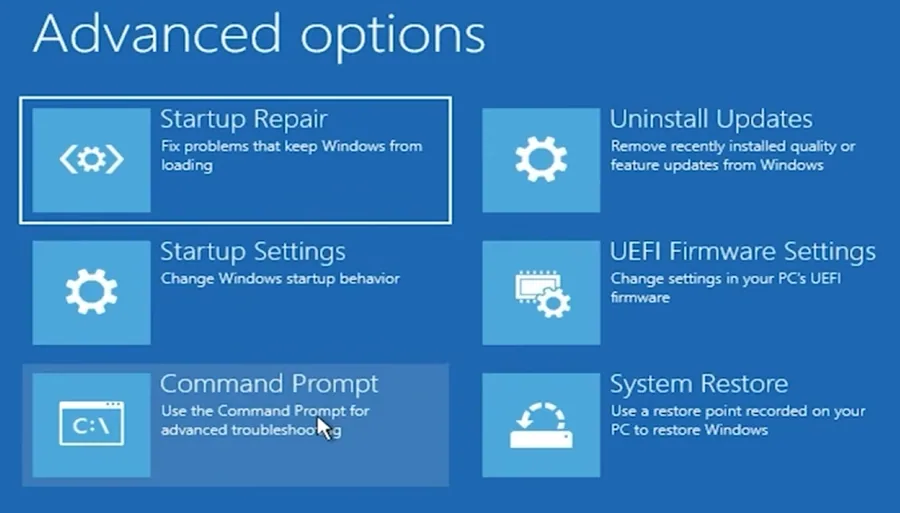
Start from Login Screen: Hold down the SHIFT key.; Restart: While holding SHIFT, click the POWER icon (bottom right) and select Restart.; Enter WinRE: Your PC will reboot into the Windows Recovery Environment. Choose an Option: After rebooting into WinRE, you'll see the 'Choose an Option' screen.; Select Troubleshoot: Click on Troubleshoot.; Advanced Options: In the Troubleshoot menu, choose Advanced Options.; Open Command Prompt: Select Command Prompt to launch it with administrative rights.
Initiating Advanced Startup
Start from Login Screen: Hold down the SHIFT key.; Restart: While holding SHIFT, click the POWER icon (bottom right) and select Restart.; Enter WinRE: Your PC will reboot into the Windows Recovery Environment.
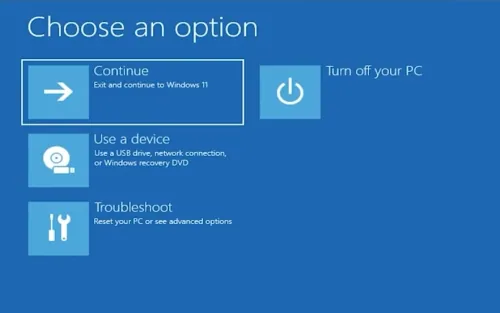
Accessing Command Prompt in WinRE
Choose an Option: After rebooting into WinRE, you'll see the 'Choose an Option' screen.; Select Troubleshoot: Click on Troubleshoot.; Advanced Options: In the Troubleshoot menu, choose Advanced Options.; Open Command Prompt: Select Command Prompt to launch it with administrative rights.
Ready for Command Input
With Command Prompt open, you can now execute commands to troubleshoot or repair your system. This method is essential for resolving issues when Windows can't start normally.
Video walkthrough
If it does not work
- How can I open Command Prompt from the Windows login screen?. To open Command Prompt from the login screen, reboot your computer into the Windows Recovery Environment by pressing and holding the SHIFT key while selecting 'Restart' from the Power options.
- What should I do if the 'Choose An Option' screen doesn't appear?. Ensure you're holding the SHIFT key while clicking 'Restart'. If it still doesn't work, you might need to initiate the Windows Recovery Environment from the Windows settings under Update & Security > Recovery > Advanced startup > Restart now.
- Can I use Command Prompt at the login screen without administrator privileges?. Accessing Command Prompt from the login screen through the Windows Recovery Environment automatically grants administrator privileges, which are necessary for performing the tasks available in this mode.
- Is it possible to perform system repairs from the Command Prompt at the login screen?. Yes, Command Prompt accessed in this manner runs with administrator rights, allowing you to execute commands for system repairs, troubleshooting, and other critical tasks before Windows fully boots.
- What if Command Prompt doesn't fix my Windows startup issue?. If Command Prompt doesn't resolve your startup issue, consider using other tools available in the Windows Recovery Environment, such as Startup Repair, or consult professional technical support.