
Gaming · Platform not recorded
How To Install Mods in Minecraft - Complete Guide
Original source date
Answer
Kickstart your modding adventure in Minecraft by first downloading and installing the Forge Mod Loader, a vital tool that lays the groundwork for integrating mods into your game. Follow these streamlined steps: Access CurseForge:Launch your browser and head to curseforge.com.; Launch your browser and head to curseforge.com.; Locate Minecraft Mods:Use the search bar to type "Minecraft" or select it from the “Featured Games” section.This will lead you to the Minecraft Mods page where a plethora of mods are available for exploration.; Use the search bar to type "Minecraft" or select it from the “Featured Games” section.; This will lead you to the Minecraft Mods page where a plethora of mods are available for exploration.; Choose Your Mod Loader:Navigate to a mod’s File tab, click on the “All Mod Loaders” drop-down, and select “Forge” as your mod loader.; Navigate to a mod’s File tab, click on the “All Mod Loaders” drop-down, and select “Forge” as your mod loader.
Download & Install Forge Mod Loader
Kickstart your modding adventure in Minecraft by first downloading and installing the Forge Mod Loader, a vital tool that lays the groundwork for integrating mods into your game. Follow these streamlined steps: Access CurseForge:Launch your browser and head to curseforge.com.; Launch your browser and head to curseforge.com.; Locate Minecraft Mods:Use the search bar to type "Minecraft" or select it from the “Featured Games” section.This will lead you to the Minecraft Mods page where a plethora of mods are available for exploration.; Use the search bar to type "Minecraft" or select it from the “Featured Games” section.; This will lead you to the Minecraft Mods page where a plethora of mods are available for exploration.; Choose Your Mod Loader:Navigate to a mod’s File tab, click on the “All Mod Loaders” drop-down, and select “Forge” as your mod loader.; Navigate to a mod’s File tab, click on the “All Mod Loaders” drop-down, and select “Forge” as your mod loader.
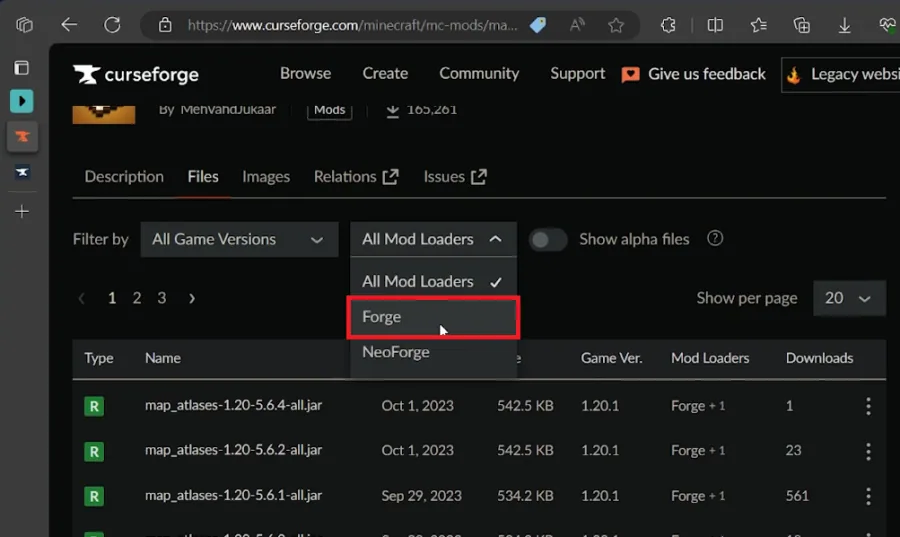
Download Forge:Ensure you download the latest version of Forge corresponding to y…
Download Forge:Ensure you download the latest version of Forge corresponding to your Minecraft game version.Disregard any warning message about the file being harmful; it's a common false alert.; Ensure you download the latest version of Forge corresponding to your Minecraft game version.; Disregard any warning message about the file being harmful; it's a common false alert.; Verify Mod Loader Installation:Before proceeding, ascertain that Forge is installed. If already installed, this step can be skipped.; Before proceeding, ascertain that Forge is installed. If already installed, this step can be skipped.; Navigate to MinecraftForge Directory:Go to files.minecraftforge.net to access the MinecraftForge directory.Download the latest version matching your Minecraft game version, for instance, version 1.20.2 as per the video.; Go to files.minecraftforge.net to access the MinecraftForge directory.; Download the latest version matching your Minecraft game version, for instance, version 1.20.2 as per the video.; Address Compatibility:For future reference, always match the Forge mod loader and Minecraft mod versions to avoid compatibility issues like game crashes.; For future reference, always match the Forge mod loader and Minecraft mod versions to avoid compatibility issues like game crashes.
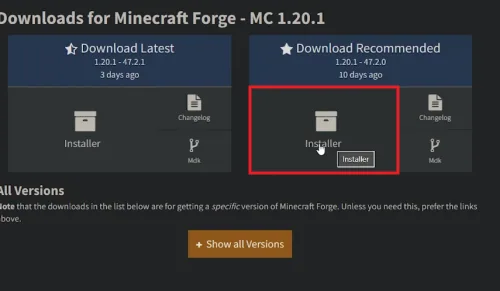
Download & Install Your Desired Mod 📥
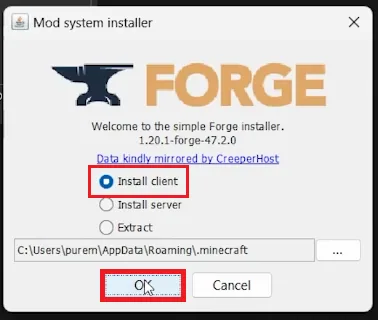
Having set the stage with the Forge Mod Loader, you're now primed to introduce your chosen mod into the Minecraft realm. These subsequent steps will guide you through downloading and installing your mod, paving the way to a revamped gaming experience. Run Forge Installer:Launch the Forge installer through the Java application.Ensure the “Installed Client” option is checked before clicking OK. Your PC will initiate the Forge mod loader download, completing the installation after a brief processing period.; Launch the Forge installer through the Java application.; Ensure the “Installed Client” option is checked before clicking OK. Your PC will initiate the Forge mod loader download, completing the installation after a brief processing period.
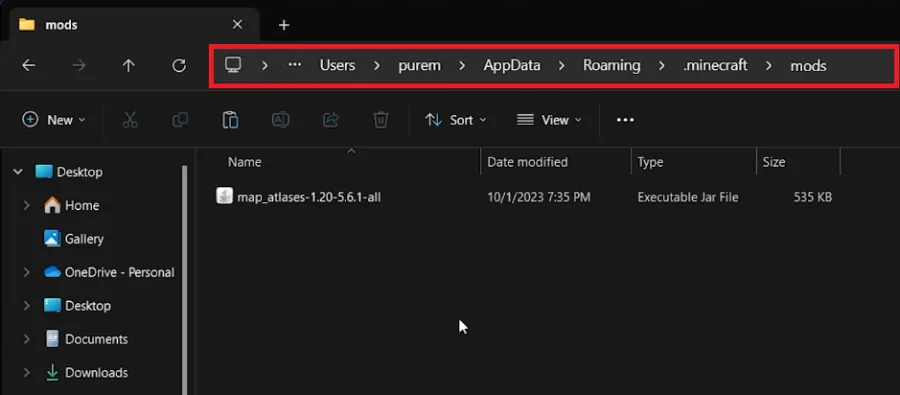
Locate Minecraft Mod Directory:Press Win+R to open the Run dialog, type %AppData%…
Locate Minecraft Mod Directory:Press Win+R to open the Run dialog, type %AppData%, and hit Enter to open the file explorer.Navigate to .minecraft > mods.; Press Win+R to open the Run dialog, type %AppData%, and hit Enter to open the file explorer.; Navigate to .minecraft > mods.; Create Mods Folder if Necessary:If a “mods” folder isn’t present, create one, indicating this is your maiden mod installation on the current Minecraft version.Drag and drop or copy-paste the downloaded mod files into this folder.; If a “mods” folder isn’t present, create one, indicating this is your maiden mod installation on the current Minecraft version.; Drag and drop or copy-paste the downloaded mod files into this folder.; Launch Minecraft with Mods:Open your Minecraft Launcher and click on the “Latest Release” option to reveal a drop-down menu.Locate and select the latest Forge version from the list, then run the game. Your mods will now be active, enhancing your Minecraft adventure.; Open your Minecraft Launcher and click on the “Latest Release” option to reveal a drop-down menu.; Locate and select the latest Forge version from the list, then run the game. Your mods will now be active, enhancing your Minecraft adventure. For example, if you’ve chosen a mod that introduces new creatures into the game, you'll now encounter these novel entities as you traverse the expansive Minecraft landscape. This seamless integration of mods via Forge amplifies the game’s allure, offering a fresh, customized experience.
Video walkthrough
If it does not work
- What is Forge Mod Loader and why is it important for installing mods in Minecraft?. Forge Mod Loader (FML) is essential software that manages the installation and compatibility of mods in Minecraft, ensuring smooth integration and functioning of mods within the game.
- How do I ensure that the Forge version I download is compatible with my Minecraft version?. Always download the latest version of Forge corresponding to your Minecraft version from the official Forge website or reputable sources like CurseForge to ensure compatibility.
- What should I do if there's no "mods" folder in my Minecraft directory?. If there's no "mods" folder, simply create one within the .minecraft directory. This is where you'll place the downloaded mod files for installation.
- Is it safe to ignore the warning message about the mod file potentially being harmful?. Yes, it's common to see such warnings due to the nature of mod files, but if you're downloading from reputable sources like CurseForge or the official Forge website, it's safe to ignore.
- Can I install multiple mods, and how does Forge facilitate this?. Yes, you can install multiple mods. Forge Mod Loader manages the mods and ensures they operate harmoniously together, minimizing conflicts and crashes.