
Gaming · Windows
How To Use Custom Crosshairs In Fortnite On PC
Original source date
Answer
Click here to download the Fortnite crosshair changer. After downloading the Fortnite Crosshair Changer file to your system, proceed to unzip the file using any unarchiving software. We suggest using 7Zip. After unzipping the content, open the Fortnite Crosshair Changer folder and navigate to Custom Desktop Logo.
Install the Fortnite Crosshair Changer
Click here to download the Fortnite crosshair changer.
After downloading the Fortnite Crosshair Changer file to your system, proceed to…
After downloading the Fortnite Crosshair Changer file to your system, proceed to unzip the file using any unarchiving software. We suggest using 7Zip. After unzipping the content, open the Fortnite Crosshair Changer folder and navigate to Custom Desktop Logo.
Toggle the Custom Crosshair ON and OFF
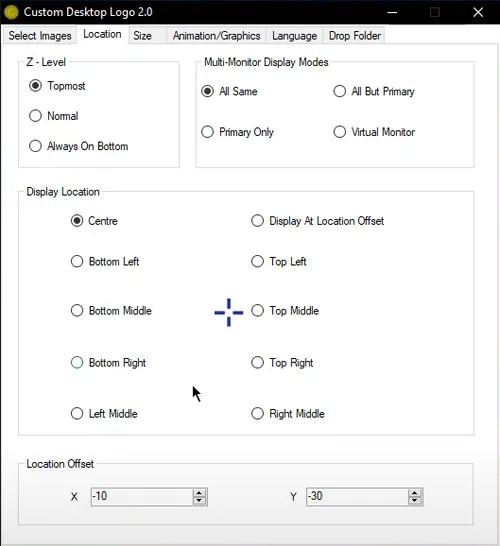
Open up your System Tray and select the Custom Desktop Logo application; On the new window, select Change Image Folder; Next, search for your newly created folder; In the Custom Desktop Logo application, navigate to the Location tab; Here, set the Z-Level at the Topmost to display the crosshair on top of any other application; In the display location section, select Centre
Video walkthrough
If it does not work
- If the current interface differs, compare it with the recorded video walkthrough.