
Gaming · Platform not recorded
How To Disable Roblox UI Navigation - (Fix Getting Stuck)
Original source date
Answer
When engaged in the engaging world of Roblox, across various platforms including PCs, tablets, or mobile devices, it's not uncommon to accidentally activate the UI navigation. This misstep may restrict your movement within the game, undermining the seamless experience Roblox offers. To regain your mobility, take the following steps:
Managing Roblox UI Navigation
When engaged in the engaging world of Roblox, across various platforms including PCs, tablets, or mobile devices, it's not uncommon to accidentally activate the UI navigation. This misstep may restrict your movement within the game, undermining the seamless experience Roblox offers. To regain your mobility, take the following steps:
Accessing the Roblox Settings
Initiate by accessing your Roblox settings, which can easily be done on a PC by hitting the ESC key.
Viewing Current Keybindings
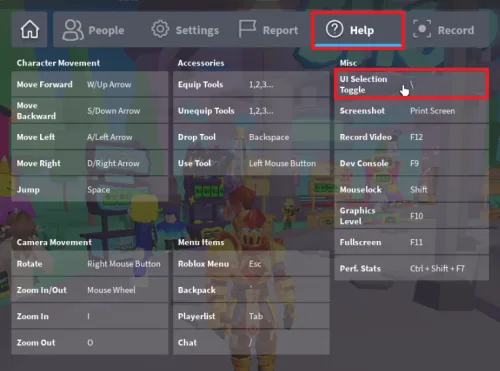
Navigate to the Help section within the settings menu. Here, you'll find an overview of your current keybindings for the game, which dictate how your keyboard interacts with Roblox.
Identifying the UI Navigation Key
Inspect the Miscellaneous category to discover which key controls the UI Selection, or UI Navigation. By default, this functionality is assigned to the backslash key (\).
Toggling UI Navigation
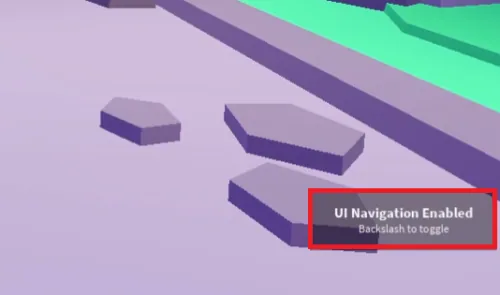
Armed with this knowledge, you can confidently exit the settings. With a simple press of the backslash key (\) on your keyboard, toggle the UI navigation ON or OFF at your convenience, ensuring your Roblox experience remains uninterrupted.
Video walkthrough
If it does not work
- What is the default key for toggling UI Navigation in Roblox?. The default key for toggling UI Navigation in Roblox is the backslash key (\).
- Where can I find the keybindings for the game in Roblox settings?. You can find the keybindings for the game under the "Help" section in your Roblox settings.
- Why can't I move in Roblox?. If you're unable to move in Roblox, it's possible that UI Navigation has been inadvertently activated. You can disable it by pressing the backslash key (\).
- Can I toggle UI Navigation in Roblox on a tablet or mobile device?. Yes, you can toggle UI Navigation on any platform where you can play Roblox, including PCs, tablets, and mobile devices.