
Windows 11 · Windows
How To Disable Laptop Keyboard when External is Connected
Original source date
Answer
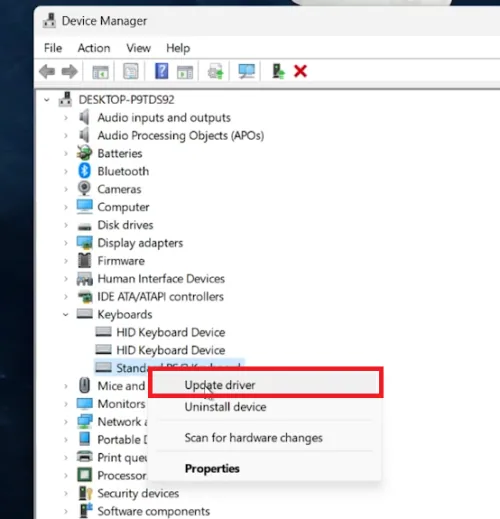
Search for Device Manager:Go to the Start Menu.Type 'Device Manager' and press Enter.; Go to the Start Menu.; Type 'Device Manager' and press Enter. Navigate to Keyboards Section:In Device Manager, find 'Keyboards'.Click the arrow to expand this section.; In Device Manager, find 'Keyboards'.; Click the arrow to expand this section.; Identify Your Laptop's Keyboard:Look for your laptop’s keyboard listing.Right-click on it for further actions.; Look for your laptop’s keyboard listing.; Right-click on it for further actions. This process is the first step in switching to an external keyboard for enhanced convenience and functionality.
Accessing Device Manager
Search for Device Manager:Go to the Start Menu.Type 'Device Manager' and press Enter.; Go to the Start Menu.; Type 'Device Manager' and press Enter.
Locating the Laptop Keyboard
Navigate to Keyboards Section:In Device Manager, find 'Keyboards'.Click the arrow to expand this section.; In Device Manager, find 'Keyboards'.; Click the arrow to expand this section.; Identify Your Laptop's Keyboard:Look for your laptop’s keyboard listing.Right-click on it for further actions.; Look for your laptop’s keyboard listing.; Right-click on it for further actions. This process is the first step in switching to an external keyboard for enhanced convenience and functionality.
Updating Driver to Disable Keyboard
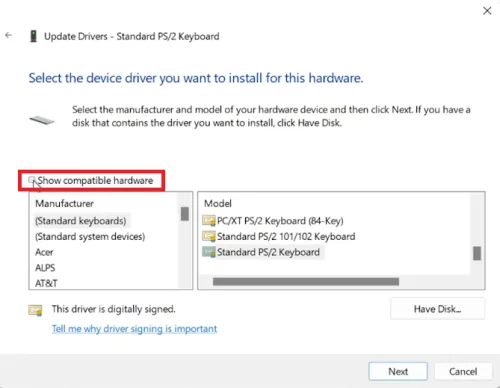
Update Driver:Right-click on your laptop's keyboard in Device Manager and select 'Update Driver'.; Right-click on your laptop's keyboard in Device Manager and select 'Update Driver'.; Manual Driver Selection:Choose 'Browse my computer for drivers'.Select 'Let me pick from a list of available drivers on my computer'.; Choose 'Browse my computer for drivers'.; Select 'Let me pick from a list of available drivers on my computer'.; Uncheck Compatible Hardware:Uncheck the 'Show compatible hardware' box.Choose a keyboard manufacturer different from your laptop’s.; Uncheck the 'Show compatible hardware' box.; Choose a keyboard manufacturer different from your laptop’s.; Change Keyboard Model:Select a different model under the 'Model' section.; Select a different model under the 'Model' section.; Confirm Changes:Click 'Next' and accept the warning prompt to proceed.; Click 'Next' and accept the warning prompt to proceed. This method effectively disables the laptop keyboard, allowing uninterrupted use of an external keyboard.
Video walkthrough
If it does not work
- Can I disable my laptop keyboard when using an external keyboard?. Yes, you can disable your laptop's internal keyboard through the Device Manager.
- How do I access the Device Manager to disable the keyboard?. Press the Start Menu, type 'Device Manager', and press Enter to open it.
- What should I do in the Device Manager to disable the keyboard?. In Device Manager, expand the 'Keyboards' section, right-click on your laptop's keyboard, and choose 'Update Driver’.
- How do I select an incompatible driver to disable the keyboard?. Uncheck 'Show compatible hardware', select a different manufacturer, and choose a model.
- Will this method permanently damage my laptop keyboard?. No, this method temporarily disables the keyboard and can be reversed by re-enabling the correct driver.