
Gaming · Platform not recorded
CSGO - How To Hide HUD
Original source date
Answer
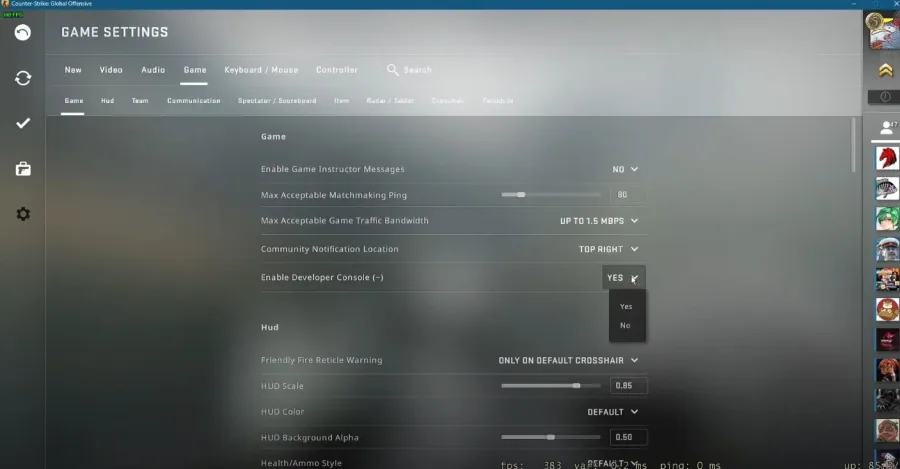
You will need to use your developer console to hide your HUD. If you cannot open it up, navigate to your Settings. In the Game section, make sure to enable your developer console, to use console commands. If you cannot open up your console, then you can bind it to another key in your Keyboard / Mouse settings under UI Keys.
Enable the CSGO Developer Console
You will need to use your developer console to hide your HUD. If you cannot open it up, navigate to your Settings. In the Game section, make sure to enable your developer console, to use console commands. If you cannot open up your console, then you can bind it to another key in your Keyboard / Mouse settings under UI Keys.
HUD Controle Commands
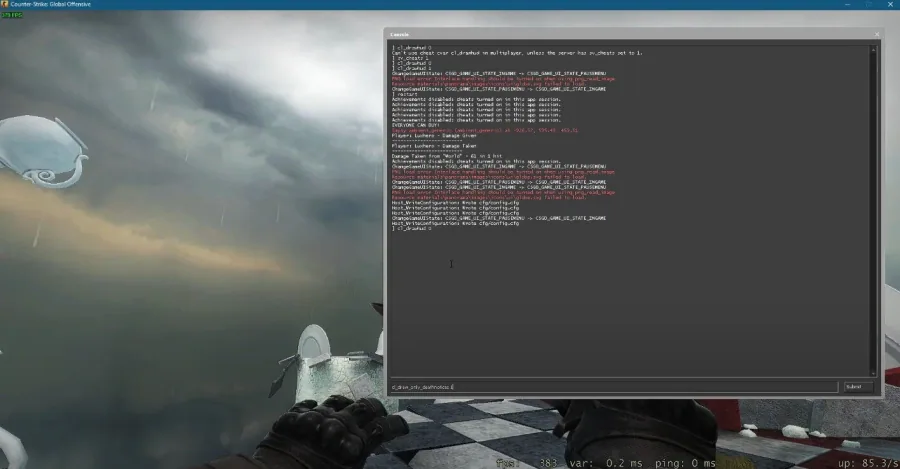
Use the following commands: cl_drawhud 0 This completely removes the HUD – even the crosshair. This will altogether remove your HUD, as well as your crosshair. If you wish to display the death notices in the corner of your screen, use the command: cl_draw_only_deathnotices 1
Video walkthrough
If it does not work
- If the current interface differs, compare it with the recorded video walkthrough.