
Gaming · Platform not recorded
CSGO - How To Fix VAC Error
Original source date
Answer
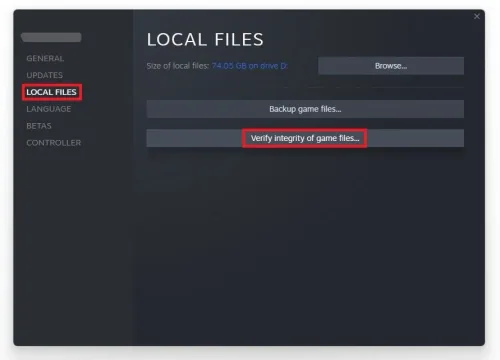
Any custom skins, installs or other changes to the game files can trigger the VAC error.; Open up your Steam library, right-click CSGO and select Properties.; On the new window, go to Local Files and select to verify the integrity of game files; This might take a minute to complete.
Integrity of Game Files
Any custom skins, installs or other changes to the game files can trigger the VAC error.; Open up your Steam library, right-click CSGO and select Properties.; On the new window, go to Local Files and select to verify the integrity of game files; This might take a minute to complete.
Task Manager
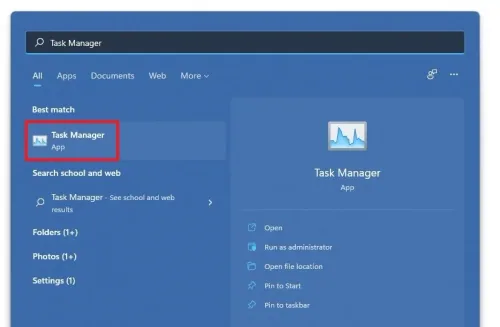
Open up your Task Manager by right-clicking your taskbar and selecting it.
In the Processes tab, make sure to end the processes which could interfere with C…
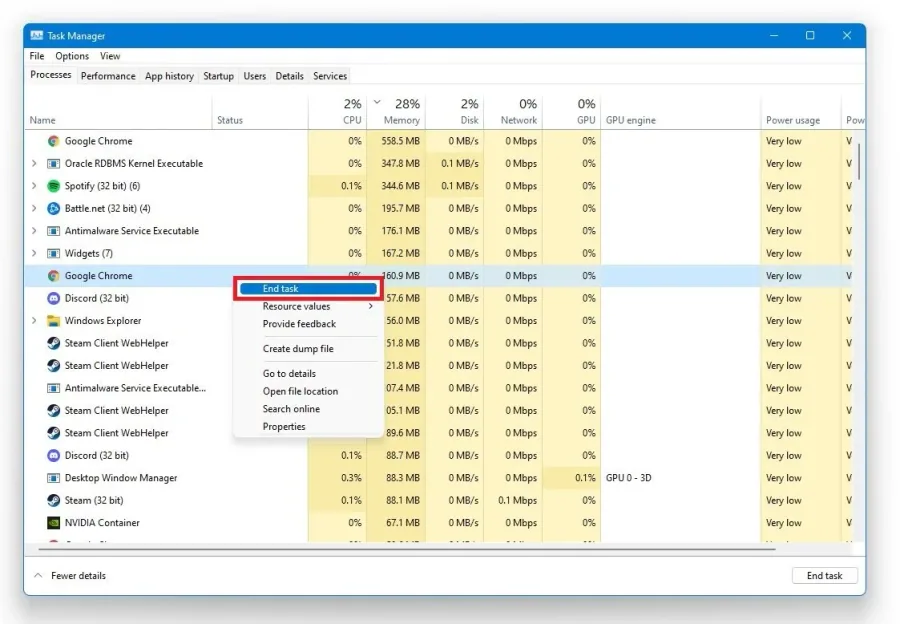
In the Processes tab, make sure to end the processes which could interfere with CSGO such as cheat software, CCleaner or your Anti-Virus.
Steam
Toggle your Steam status OFF and then ON again. This may seem strange, but it has helped with a lot of users. As as last resort, you will have to reinstall CSGO using your Steam application.
Launch Options
Open up your Steam Library Right-click CSGO and select Properties; On the new window, select Set Launch Options Use the following commands: -autoconfig; -windowedYou can switch from a windowed window mode back to fullscreen in your CSGO in-game settings.; You can switch from a windowed window mode back to fullscreen in your CSGO in-game settings.
Video walkthrough
If it does not work
- If the current interface differs, compare it with the recorded video walkthrough.