
BlueStacks 5 and LDPlayer 9 both let you play Android games and use Android apps on a Windows PC. They do the same basic job, but they can feel very different depending on your hardware and the game you want to run.
The comparison below covers six benchmark categories across Intel, Nvidia, and AMD test systems. BlueStacks finishes ahead in most of the charts, while LDPlayer takes the AMD multi-core result. The biggest difference is startup time. These numbers are useful for comparing the two emulators, but they cannot tell you exactly how either one will perform on your computer.
Quick comparison
| Test | What the charts show |
|---|---|
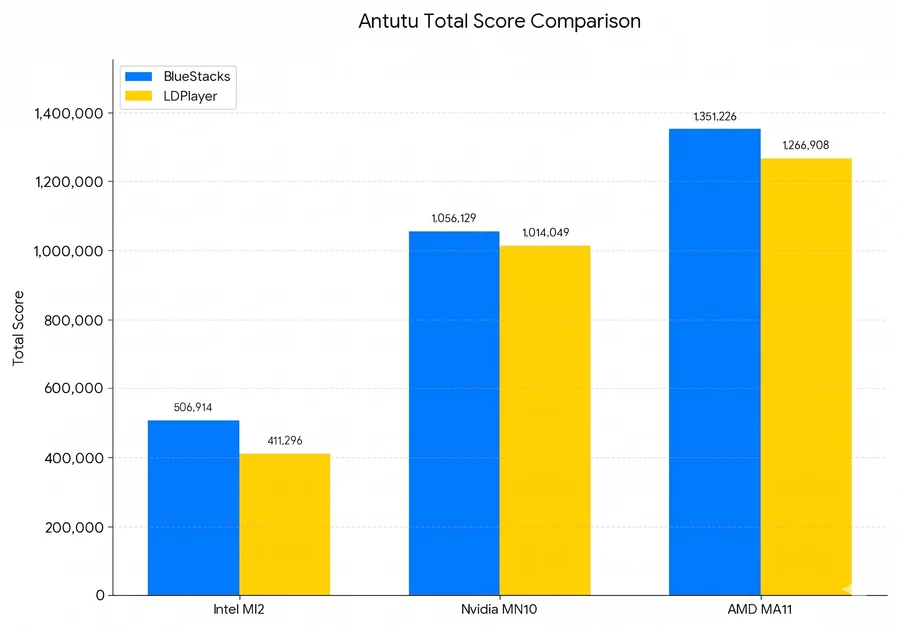
| AnTuTu total score | BlueStacks leads by about 23.2% on Intel, 4.1% on Nvidia, and 6.7% on AMD. |
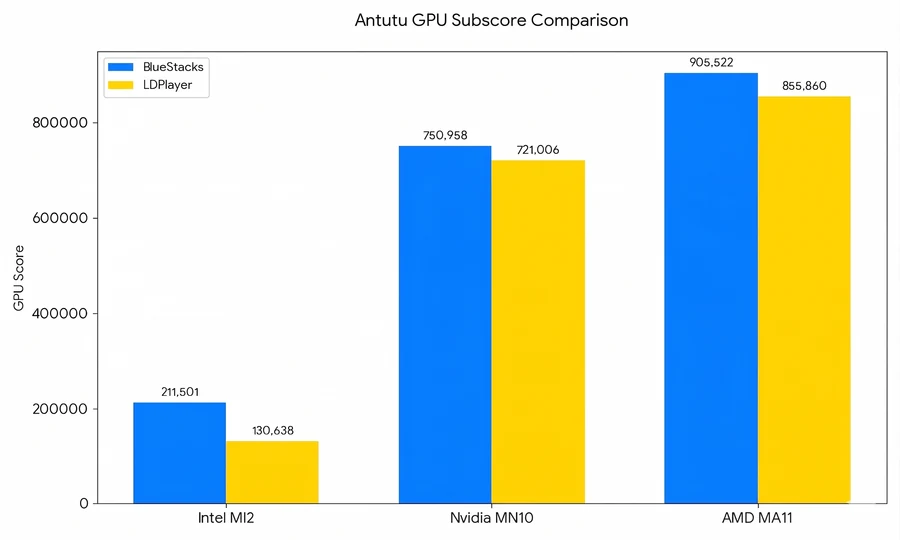
| AnTuTu GPU score | BlueStacks leads by about 61.9% on Intel, 4.2% on Nvidia, and 5.8% on AMD. |
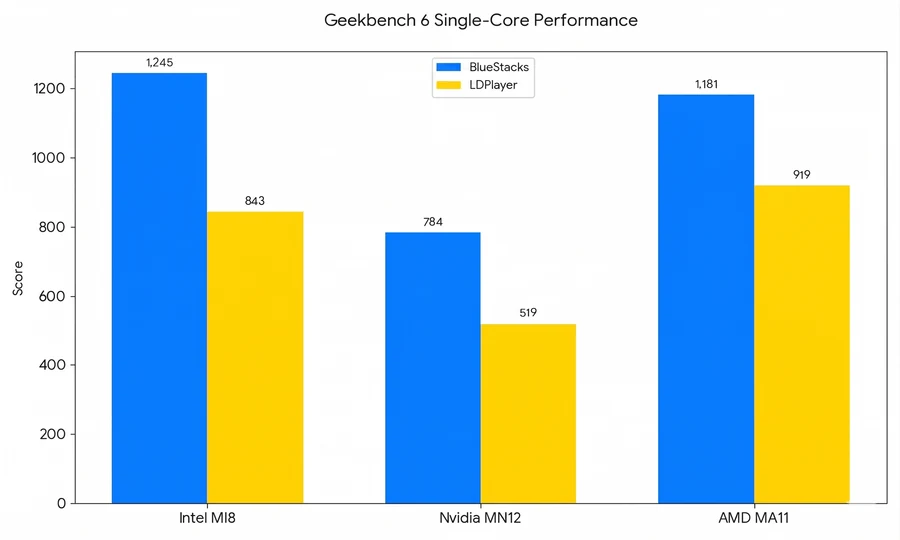
| Geekbench 6 single-core | BlueStacks leads on all three shown systems; the largest gap is about 51.1% on Nvidia. |
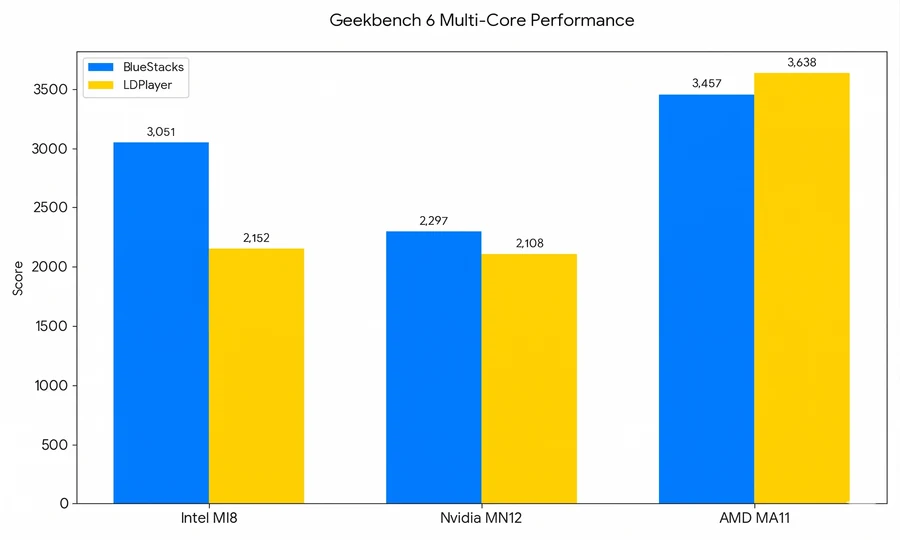
| Geekbench 6 multi-core | BlueStacks leads by about 41.8% on Intel and 9.0% on Nvidia. LDPlayer leads by about 5.2% on AMD. |
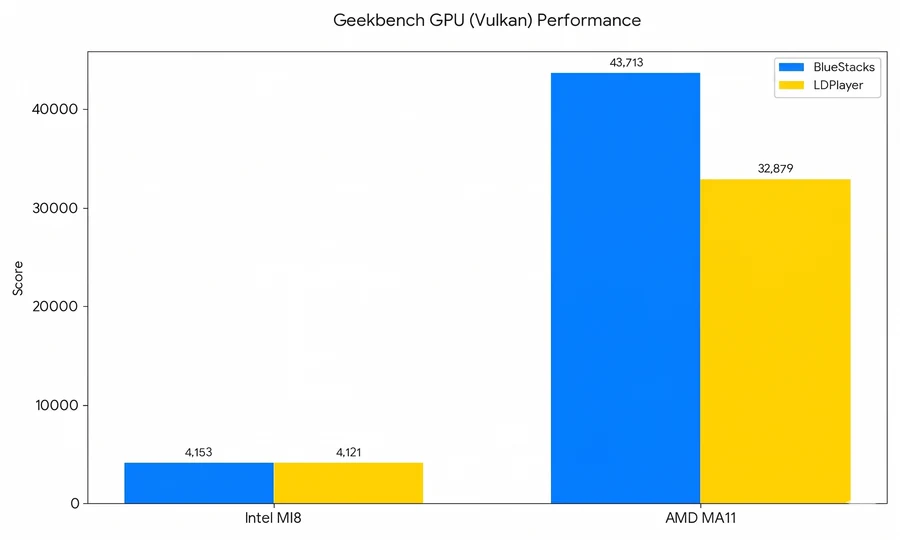
| Geekbench Vulkan | BlueStacks leads by about 0.8% on Intel and 33.0% on AMD. No Nvidia result is shown. |
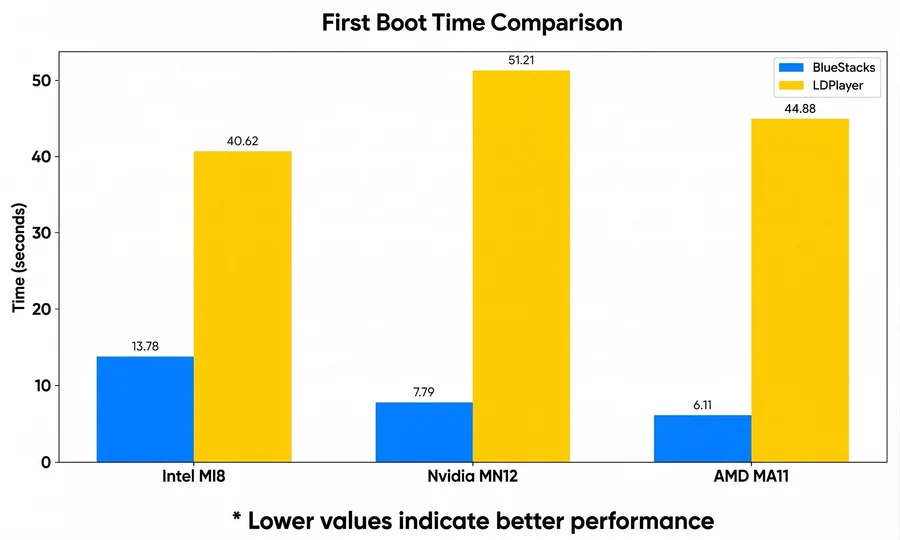
| Startup time | BlueStacks uses about one-third of LDPlayer's time on Intel and about one-seventh on the Nvidia and AMD systems. Lower is better. |
Before reading too much into the numbers
The report does not include enough detail for someone else to repeat the tests exactly. For example, it does not list the complete hardware models, RAM and storage setup, exact emulator versions, assigned CPU cores and memory, resolution, or the number of test runs. A higher benchmark score also does not mean every game will run faster by the same percentage.
Overall performance
AnTuTu's total score combines several areas, including CPU, graphics, memory, and interface performance. In the published charts, BlueStacks 5 scores higher on the Intel, Nvidia, and AMD configurations. The largest difference is on Intel, where its total is about 23.2% higher. The Nvidia and AMD gaps are smaller at about 4.1% and 6.7%.
This gives BlueStacks the higher overall benchmark result on the three test systems. It does not mean a particular game will load or run faster by the same margin. Games can react differently to the emulator's graphics mode, Android version, controls, and your PC's drivers.
Graphics and gaming performance
The AnTuTu GPU test focuses on graphics work such as drawing 3D scenes. BlueStacks leads on all three configurations in this chart. The Intel result stands out at about 61.9%, while the Nvidia and AMD differences are much closer at about 4.2% and 5.8%.
That Intel result may be useful if you have a laptop without a separate graphics card. Even then, a benchmark score is not the same as an in-game frame rate. The game, resolution, frame-rate limit, and graphics mode can all change the result.
Single-core responsiveness
Single-core performance measures work handled mainly by one processor core. It can affect menu navigation, input response, and game tasks that do not spread evenly across several cores.
BlueStacks scores higher in all three Geekbench 6 single-core comparisons. The differences are about 47.7% on Intel, 51.1% on Nvidia, and 28.5% on AMD. These percentages describe the benchmark scores, not the frame-rate increase you should expect in every game.
Multi-core performance
Multi-core performance matters when work can be shared across several processor cores. It can become more important when you run multiple emulator windows, record gameplay, stream, or keep other demanding apps open.
This is the exception to the overall pattern. BlueStacks leads the Intel result by about 41.8% and the Nvidia result by about 9.0%, but LDPlayer is about 5.2% higher on the AMD system. In other words, neither emulator wins every result shown here.
Vulkan performance and stability
Vulkan is a graphics interface used by many games and apps. Good Vulkan support can improve performance or compatibility in software designed to use it.
BlueStacks scores about 0.8% higher on Intel and 33.0% higher on AMD in this chart. There is no Nvidia score to compare. BlueStacks says LDPlayer did not complete that test because of a stability problem with certain drivers, but Tech How did not repeat the test. That result should not be treated as evidence that LDPlayer has the same problem on every Nvidia PC.
Startup time
Startup time is easy to notice because it affects how long you wait before using the emulator. Lower numbers are better in this chart.
BlueStacks starts in 13.78 seconds on Intel, 7.79 seconds on Nvidia, and 6.11 seconds on AMD. LDPlayer takes 40.62, 51.21, and 44.88 seconds respectively. In these tests, BlueStacks uses about one-third of LDPlayer's startup time on Intel and about one-seventh on the Nvidia and AMD systems. Your storage speed, Windows background activity, antivirus software, and emulator settings can all affect how long either emulator takes to open.
Which Android emulator should you choose?
If startup speed is your main concern, BlueStacks has the stronger result in these tests. The Intel GPU score is also the largest gap in the graphics chart.
LDPlayer can still work better with a particular game, PC, or control setup, and it leads the AMD multi-core result shown here. Compatibility and steady performance in the game you actually play matter more than winning a general benchmark.
How to compare both on your own PC
- Install each emulator from its official site: BlueStacks and LDPlayer.
- Give both emulators the same number of CPU cores and the same amount of memory.
- Use the same Android game, resolution, frame-rate limit, and graphics settings.
- Repeat the same scene for several minutes after a fresh start. Note the average frame rate, visible stutters, input response, crashes, and startup time.
- Repeat the test at least three times. Choose the emulator that is more consistent for your game, not just the one with the highest single result.
What is the practical answer?
BlueStacks wins more of the benchmark results on this page and starts faster in all three startup comparisons. It is not a clean sweep: LDPlayer is higher in the AMD multi-core chart, and there is no Nvidia Vulkan result to compare.
For most people, the practical answer is to test the game they actually play in both emulators. Keep the one that gives you steadier frame rates, fewer crashes, better controls, and a smoother experience on your own PC. That matters more than the highest score in a general benchmark.
Frequently asked questions
Is BlueStacks 5 faster than LDPlayer 9?
BlueStacks is faster in most of the benchmark results shown here, but not all of them. LDPlayer scores higher in the AMD multi-core chart. Your result can also change with your hardware, drivers, game, and settings.
Which emulator starts faster?
BlueStacks starts faster in all three supplied startup comparisons. The shown times are 6.11 to 13.78 seconds for BlueStacks and 40.62 to 51.21 seconds for LDPlayer.
Is BlueStacks better for computers with Intel graphics?
BlueStacks has its largest AnTuTu GPU advantage on the tested Intel configuration, at about 61.9%. That does not guarantee the same difference on every Intel PC or in every game.
Which emulator is better for multiple instances?
Multi-core performance can matter for multiple instances, but the chart is mixed. BlueStacks leads the Intel and Nvidia multi-core results, while LDPlayer leads the AMD result. Test the number of instances you plan to use on your PC.
Can benchmark results predict gaming performance?
Benchmarks can compare a controlled workload, but they cannot predict every game. Game compatibility, graphics drivers, emulator settings, resolution, and assigned resources can all change the result.