
Gaming · PC & mobile
How To Log Out & Switch Accounts in Apex Legends Mobile
Original source date
Answer
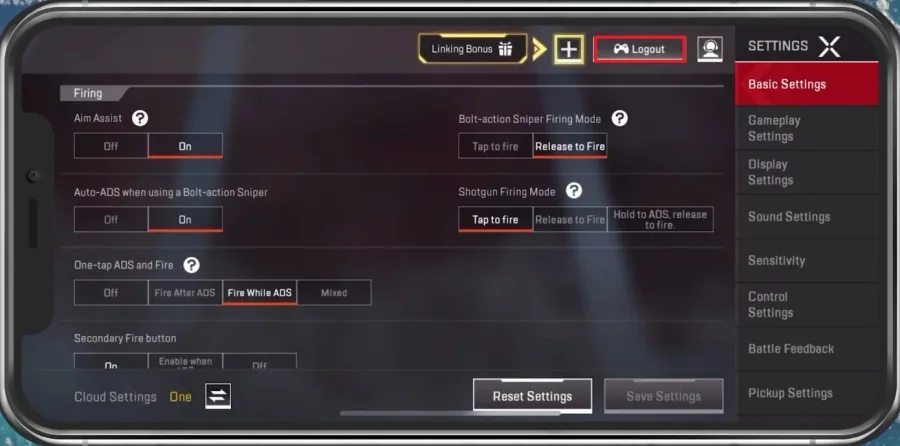
While playing Apex Legends, navigate to your in-game settings. Tap on Logout at the top right of your screen. This will ask you if you want to log out of your current account. Simply select Ok and then it will take a few seconds for the login video and loading to take place.
Log Out In Apex Legends
While playing Apex Legends, navigate to your in-game settings.

Tap on Logout at the top right of your screen
Tap on Logout at the top right of your screen. This will ask you if you want to log out of your current account. Simply select Ok and then it will take a few seconds for the login video and loading to take place.
Apex Legends Log In
Sign in with your Apple ID, play as a Guest user, and when selecting More, you can choose to log in with your Facebook or EA Account.
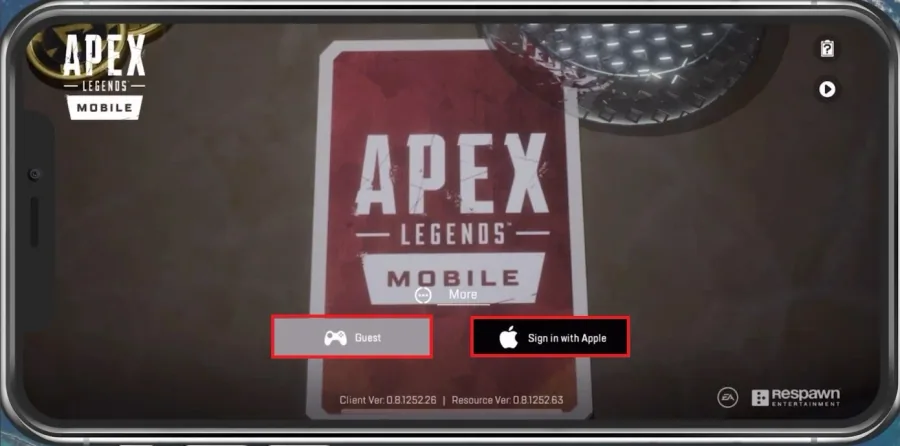
If you played as a guest user before and logging in with another account now, you…
If you played as a guest user before and logging in with another account now, you should be prepared to lose your game progress. I’d suggest logging in with an account where you haven’t played Apex Legends to link your current guest account progress to that account. You can then switch from one account to another without losing progress.
Video walkthrough
If it does not work
- If the current interface differs, compare it with the recorded video walkthrough.